Walmart is Building Out a HUGE EV Charging Network! We Tried One of Their New Sites
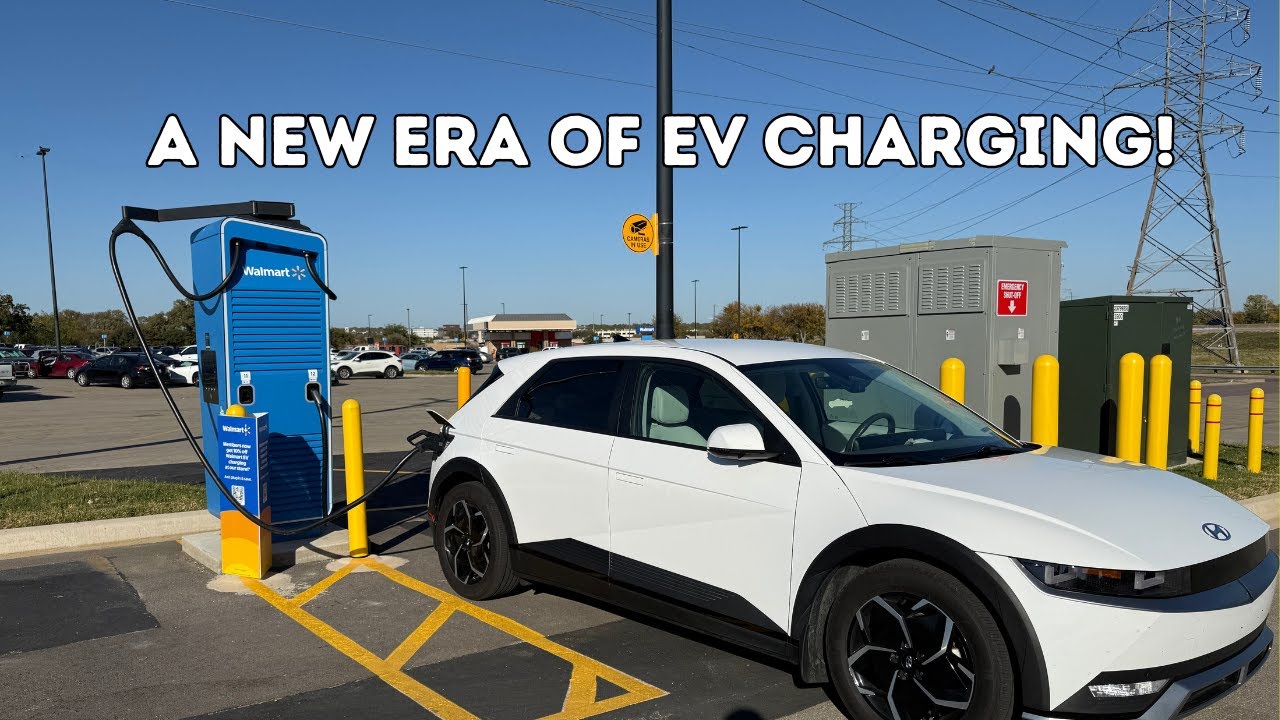
Hey everyone, it’s Joel and Sebastian back with you EVG Studios. And today, as you can see, we are at a Walmart charging station here in where, Sebastian? Bedford, Texas. Bedford, Texas. Everything’s bigger in Texas. As you can see, there’s a Walmart behind us. Now, this is not an EA station. This is a Walmart owned EV charging station. So, tell us a little bit about this unit before we kind of get into the the tech the technical stuff about it. Yeah, so Walmart currently is rolling this out pretty rapidly through VS. Also, I apologize. I’m losing my voice. Um, so I have to use my DJ voice apparently and if it goes away in the middle of this, Joel, you have to take over. Anyway, they’re starting to roll this out pretty rapidly nationwide. And at this site, they’re using the Alpronic Hick 400 units. So these are capable of 400 kilowatts. You can see you have CCS and Knacks at this location. Um, they’re split CCS Knacks on each one. And you can see you have um, so this is a conversation I’ve seen. Some people think these are backwards. I kind of don’t because they could put the knack and CCS on this side and I guess that would be that would still not you know what I mean? It’s like Tesla ports on this side like my port sorry motorcycle my ports on this side so I guess we’ll have to cross streams I guess. Yep. But I don’t know. You tell me. Do you think they should be flipped around? Do you think there should be like a knack dedicated unit? I don’t think it really matters. Does it matter at all? Yeah. Um eventually I’m sure there’s going to be eventually once more cars have knacks that you can come switch out the cables, put another knack cable in if you need to. Yeah, but it’s super interesting, super neat. I’m excited to see how fast they’re rolling this out. Um, between them and like Ayana, we’re kind of seems like we’re entering this golden age of EV charging. And I think at this point, it’s a good time. We should break here and we’ll get over here. We can show off what we can do on the screen of the Alpronics. We’ll show off how to start it, um, etc. And then go from there. All right. Stay tuned. [Music] All right, we have made our way over to the unit. So, first thing it kind of tells you up here directions on what you need to do. So, it looks like you do need the Walmart app, correct? Yeah. So, that’s been a kind of a point of contention. There’s no credit card readers on these. I think that’s wrong. Like, let me activate through the Walmart app, but I also feel like I mean this is you don’t, you know, it’s like a gas pump, right? You should be able to just walk up and pay for it. You shouldn’t have to have an app and then an account with the app and all this just to charge your car. From what I remember, it’s not really easy to find in a Walmart app. It’s kind of Well, we’ll get there. It depends. Um, but let’s look at the screen here. You can see this station. They’ve got the new branding applied to it. You can see plug in to get started. This one’s doing a timebased charging. So, if you charge between 11 p.m. and 8 a.m., it’s 25 cents. That’s not bad. This is 46 cents, which is still honestly not that bad. And you can come down here. You can hit like instructions. It’ll tell you scan the pack Walmart um whatever. You have a customer support icon there as well. Forgive these aren’t touchscreen. Um, so there’s who you call. Come back home. You come here to connectors. So if someone’s charging, you can hit there. You come in here. It’ll show you what session is going on. We’ll show that here in a sec. Really not much else. You also have language selector. So you can come in here and apparently only do English. I’m sorry to our Spanish speaking friends in Dallas. Yes. Um, anyway, so let’s go back. Let’s do the app now. Let me start a screen recording. Wait for it to start. There we go. Open up the Walmart app. And you can see this is the best. This is how it’s supposed to work. It knows my location. It automatically pops up store mode. You’ll see at the very top EV charging at Walmart. I’ve seen sometimes where that doesn’t pop up automatically. Then you have to do it basic. Only way I can tell, someone tell me in the comments if I’m wrong, is you can come up here to a search and you search for EV charging and it pops up. Gotcha. So, I’m going to click that. You see it’s going to load. It kind of looks like a different app almost. Scan the QR code on the charger screen. Okay. So, I guess I hit instructions. Scan. [Applause] It wants me to know am I using CCS or NAS? You’re going to use CCS as my card info cuz I already had a Walmart account. Payment offer very soon. Pay my progress. It did not tell me if I needed to already have the car plugged in or not. We’re about to find out. [Applause] Payment authorization. There we go. Payment declined. Uh oh. Uh, okay. One moment. Cut that real quick. All right, we are back. And Sebastian did not have an updated credit card. Yep. I had to put my new card in, which is why it should just have a credit card reader so I can just pay for it. Yep. Anyway, got it updated. Let’s try again. Start charging. I’m using CCS. Start charging. They’ve been off in progress. Trying it all over again. Surprising it takes this long to authorize. I know. It’s like it has a plug in the connector. It says on the screen and just came up in the app. Let me plug it in. This uh Ballard is inconvenient in my way, but I guess you can show that real quick. Yep. By the way, if you are a Walmart Plus member, looks like that you get 10% off EV charging. So, so let me get the Alpronic cable management to come out. There we go. Look at that. That ballard is inconvenient. Are we in? We’re latched in. We’ll come back over here. charging started. You got the typical outputic interface here and your switches going inside. Now, some stations have the Alpatronics. What else are they also using? So, they’re also seem to be deploying a lot of AB A400 units. Okay. Um I think those are currently kind of localized to like Phoenix and Florida. Okay. Um but I think I saw something considering permits. They’re about 50/50 split. Gotcha. Uh, car just spoke to me. So, charging started. The car is turned on currently because the AC’s on. Someone’s in there. So, we might not see awesome power here, but you can see I’m at 29%. Connector 11. There’s our energy delivery, charge time. I love on these alpies, you can hit charge detail, and it’ll actually show you your curve, which I think is pretty sweet, as well as volts and amps and all that jazz. Go back. And after you walk away for a while, it’ll be on this screen again. So, if you wanted to see that again, you would hit active sessions, select CCS. You’re hitting 2 and 9 kilowatt. You’re you’re you’re peeking. There you go. Okay, cool. I didn’t know if it would do it with the car on. Gotcha. Um, and I keep accidentally locking my phone and not starting my screen recording. So, let me just show this real quick. Um, you can see in the app here, it shows me my battery level, shows me energy, deliver, charging time, subtotal, how much it’s costing me, ask me if I want to stop charging. Gives me another ad here telling me I could save 10% by having Walmart Plus, um, which I don’t have. And also like you can see it has a little live activity as well. So you can pretty easily come in here and stop charging that way and see your percentage. So if you’re in the store and you need to stop charging, you tap that stop charging. And you don’t have to unlock your phone to see that. I think that’s pretty cool. Um but yeah, I mean I expect we get a decent session unless the car gets hot. So 226 85 degrees outside, but 226 ramped right up. No problems. And my only I’ve seen people complain about I don’t know that it’s really any different with other networks is it seems like it would be really easy for someone to come in here since you have to come through and then select your connector if someone selects the wrong connector and it ends up stopping your session when they think they’re stopping theirs. Oh, okay. Um again, I don’t know if that’s actually a big deal, but I’ve seen people have some concern about it. Um but yeah, overall other than not having a payment terminal, I still think that’s a miss. Using the app is semi easy, but you have to make sure your payment methods are in there. if you have different cards you want to use, etc., it’s a bit more of a hassle versus just tap. And the nice thing, these are solid units, too. Yeah, these are solid units, so I don’t have expect any issues with the units. But yeah, I mean, super easy process uh once you get it going. Nicely designed, nice interface, easy to use, etc. All right, so we’re going to go inside, actually go shop for a minute. Uh we’re going to come back and show them our final stats if you want to. Sure, if we can. All right, cool. So, we’ll see you in a bit. All right. All right, we are back after our quick trip into Walmart to grab some things for our our little stay here in Dallas. All right, Sebastian. So, what do we have for kind of final stats on this charge session? Yeah, so we’ve not been here very long. I do have a correct with the app. I’ll tell you in a second. We come up here. I do like seeing um active sessions. We’ll hit CCS. See, we put in so far 46 kilowatt hours in 16 minutes. We’re at 88% pulling 70 kilowatts. And there’s a curve. It’s got a weird dip right there. I mean, otherwise it just kind of stair step. I guess since we started at 30% or 29%, you’d skip the Korean siesta. Yep. Which is cool. pulling 86 amps now at 792 volts. And my gripe with the app, I’ll go ahead and show you real quick. I wish this screen, you know, it tells you how much is delivered, how long you’ve been charging for, and how much it cost, which also tells you your charge speed. Ah, okay. Cuz, you know, sometimes like this these cars, you know, if they get hot or whatever, they’ll severely throttle your speed. And if you’re inside Walmart, you might not know that. You might not know that your car is charging so slow or why it’s charging slow or anything like that. So, I do kind of wish there was an additional piece of info on this screen, but that’s fine. I’m going go ahead and hit stop charging. Are you sure? Yes. Stopping. We’ll come over here, unplug, and that’s that. All right. So, if you’re ever at a Walmart and you see these new units, these are Walmart owned EV chargers. Most of them are the electronic units, but you will see some AV units. So, thank you for joining us today. Don’t forget to subscribe to this video, click that notification icon, and we’ll see you again on another EV Studio video review, whatever you want to call it. Goodbye, everyone. Bye. [Music]
On Today’s Episode, Joel and Sebastian are in Bedford, TX (DFW Area) trying out a new Walmart EV Charging Station. We walk through some of the hardware choices, how to activate the app, and more.
Questions? Comments? Interested in being a guest? Email us at info@evgeekstudios.com
Our Recommendations from Amazon: https://www.amazon.com/shop/theevgeek
*Need a NACS to CCS Adapter? Consider one of the following brands:*
Lectron: http://evgs.xyz/Lectron
A2Z EV: http://evgs.xyz/a2z
EV Geek on X: https://x.com/theEVgeek
Sebastian on X: https://x.com/KilowattStation
Join this channel to get access to perks:
https://www.youtube.com/channel/UCeq5ILPa3MVSHwuZjb0M4Yw/join
Check out the EV Geek Store at shop.evgeekstudios.com
Become a Patreon member and help support and grow our podcast! https://patreon.com/EVGeek
*When buying something using links or promo codes we share, we may earn a small affiliate commission to help support our channel. This does NOT impact our reviews.*
#electricvehicle #automobile #electriccar