Tips, Tricks and Special Features of the BMW X3 SUV | BMW How-To
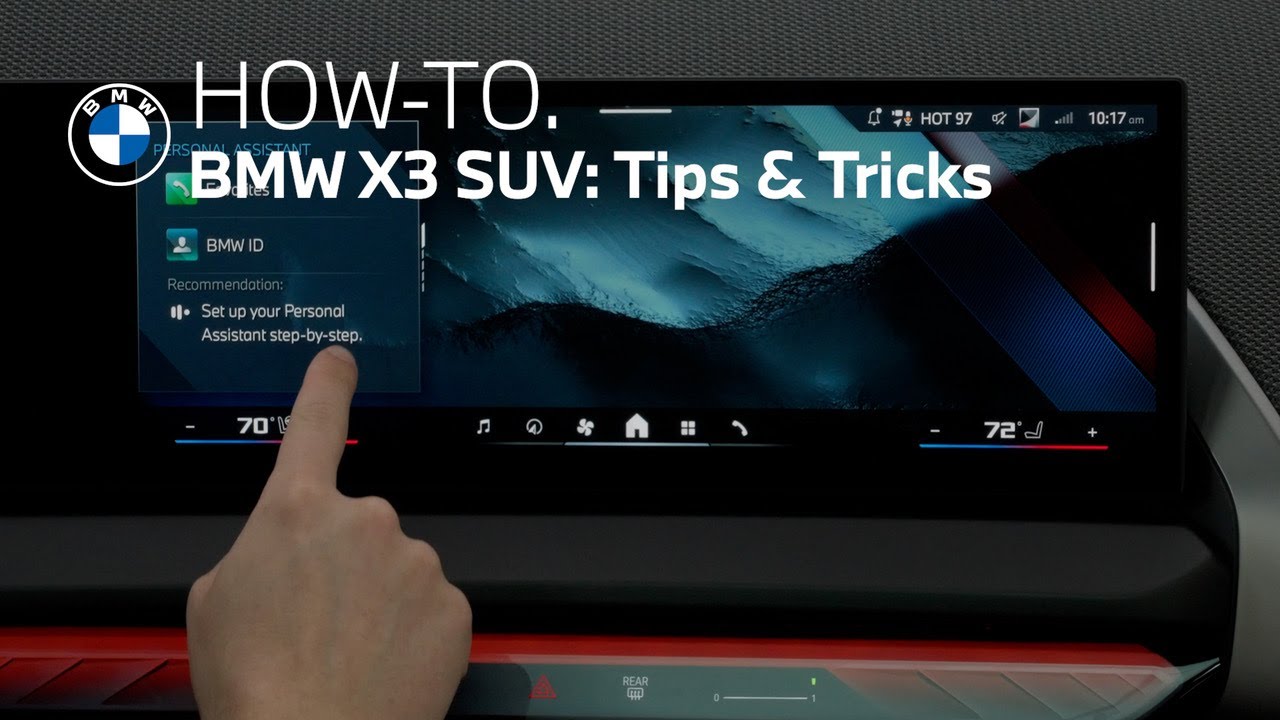
the versatile BMW X3 delivers all-terrain performance power and efficiency in a rugged utility vehicle it sets the bar for how intuitive and intelligent technology can be in this video we’ll highlight some features of this X3 that help define the ultimate driving machine a feature that makes your driving experience truly unique is your BMW ID and adding your BMW ID to your vehicle is simple tap the BMW ID menu and select add BMW ID with your smartphone scan the QR code on the display after your profile has loaded toggle the vehicle key to link the key to your profile select finish to complete the setup and add your BMW ID to the car you will need to use the My BMW app to complete setup on your mobile device open the My BMW app follow the prompts as directed and accept the connected drive terms of use to finalize the process you’re all set your vehicle is now added to the My BMW app all user data and profile settings you’ve saved in the BMW cloud will be downloaded your personal settings are automatically activated when you open the car with a linked key in the BMW ID profile settings you can see which keys are linked to your profile manage profiles and even adjust lock screen options via the settings if you have not already linked a key to your profile tap the BMW ID menu select profile settings and then select the plus sign to link a key to your profile you also have the option to link your smartphone as a digital key to your BMW ID additionally you can add or remove a PIN to prevent unwanted access to your screen select the lock screen menu click the plus tile to set a PIN and follow the prompts it is important to note when a PIN has been added to a BMW ID it must be entered every time to activate the screen similar to how a smartphone operates if you wish to remove your pen select the trash can tile on the screen and follow the prompts comfort is a key component of your driving experience let’s take a look at how to get the most out of the climate control system the climate control system is operated through the central display screen tap the fan icon on the bottom menu bar to access the full range of settings for manual adjustments you can choose from presets like front footwell or windshield vents and make adjustments to fan speeds use the max defrost button for quick windshield defogging this feature optimizes air flow and temperature to clear fog and refresh the cabin quickly for effortless comfort rely on autoclimate control once you set your preferred temperature the system automatically adjusts air flow heating and cooling settings to maintain a consistent cabin environment no matter the weather outside you can further adjust fan speed for maximum comfort to set your desired cabin temperature use the plus and minus icons your BMW features dual zone climate control so you and your passenger can set individual preferences for ultimate comfort you can also use the sync button to keep the driver and passenger at the same temperature heated seats and steering wheel are key to staying warm during colder months while ventilated seats keep you cooler in warm months you can choose between three levels of intensity for each feature [Music] or set the features to autoactivate based on outside temperature choose from a low setting all the way to very high to direct air about the cabin locate the vent controls placed throughout the dashboard and move them in the same direction you would like air to flow to open or close event locate the airflow intensity bar and swipe towards one to increase air flow and towards zero to reduce air flow the BMW X3 offers five levels of air flow intensity for each vent to help maximize comfort on your journey the new BMW operating system 9 offers intuitive touch control on the BMW Curved display to configure the home background swipe inwards from the right then select my modes or the map view of the BMW navigation system scroll through the widgets on the side to see all features like intelligent personal assistant radio telephone functions media destination input vehicle information as well as time and date swipe right or left on the widget for more content and direct access to the most important features tap a widget to enter its menu swiping down from the top opens your personal tool belt for menu shortcuts and favorite functions here you can easily store favorite radio stations or quick access to other media or functions all in one place you’ve got an intelligent personal assistant right on board hey BMW find me the nearest coffee shop here’s what I found you can say things like “Take me to the first one which one do you want?” The first one okay coffee stop 82 Broadway this seamless technology builds a comprehensive profile over time that learns your preferences including frequent destinations and climate settings and can help you with everything from finding your nearest gas station to playing your favorite songs after logging in with your BMW ID go to the personal assistant app or click the widget on the control display here you can see example commands and tips now get the intelligent personal assistant ready activate online speech processing and data analysis for the best experience for enhanced results your intelligent personal assistant needs a good data connection if you’d like you can temporarily disable or turn off the auto start stop function during a drive toggling the gear selector to S or L mode allows the engine to keep running during a quick left-hand turn across traffic or during parking maneuvers to disable auto start stop during a drive swipe down from the top of the central information display and press the auto start stop tile alternatively you can press the driving settings menu button in the central control stack and select the deactivate auto start stop tile lastly utilizing the my modes button selecting sport driving mode will automatically disable auto start stop all in all the X3 is impressive from all angles and offers technology that empowers you to drive your way adventure is calling louder than ever [Music]
*Discover the 2025 BMW X3: Power Meets Precision*
The all-new BMW X3 (G45) blends rugged utility with sophisticated technology and luxury design. In this video, explore how the X3 redefines your daily drive with intelligent systems and customizable comfort.
*Set Up Your BMW ID and Digital Key*
Personalize your X3 experience with a BMW ID linked directly to your key and smartphone. Learn how to scan the in-car QR code, connect via the My BMW App, and sync your personal settings like climate preferences and radio stations to the cloud.
*Lock Screen & PIN Control for Enhanced Privacy*
Protect your profile with a custom PIN—similar to unlocking your smartphone. You can set, remove, or update your screen lock PIN directly in the display’s Lock Screen menu.
*Comfort Redefined: Dual-Zone Climate Control*
Operate the full range of climate features from the central screen. Manually adjust air flow and fan speed, or use Auto Climate Control for consistent comfort. The X3 offers heated and ventilated seats, a heated steering wheel, and 5 airflow levels—tailored for any weather.
*BMW Operating System 9: Curved Display and Widgets*
The X3’s curved touchscreen puts everything at your fingertips. Access My Modes, maps, widgets, and intelligent personal assistant features with swipe gestures and menu shortcuts via your personal tool belt.
*Use Widgets for Smarter Driving*
Swipe through customizable widgets for media, destinations, weather, vehicle data, and more. Tap any widget to dive deeper, or swipe down for quick menu access to favorites like radio stations and navigation.
*BMW Intelligent Personal Assistant*
Get to know your voice-activated companion. This AI-powered assistant learns your routines and preferences over time—helping with directions, climate settings, entertainment, and more. Activate online speech processing for the best experience.
*Disable Auto Start Stop Instantly*
Want the engine to stay running at a red light or in tight traffic? Disable Auto Start Stop using the gear selector in S or L mode, via the central display tile, or by switching to Sport Mode with the My Modes button.
*The 2025 BMW X3: Adventure Starts Here*
Whether you’re on a winding road or a weekday commute, the X3 delivers performance, tech, and personalization in one dynamic package. Experience the next generation of The Ultimate Driving Machine.
Continue watching our How-To series to explore all the innovative features of your BMW!
Looking for a quick answer? Check out our FAQ page : https://faq.bmwusa.com/
Refer to your owner’s manual or visit: https://www.bmwusa.com/owners-manuals.html
Need further help? Contact us here: https://www.bmwusa.com/contact-us.html
Follow BMW USA for the latest in luxury cars and performance vehicles:
Facebook: https://www.facebook.com/BMWUSA
Instagram: https://www.instagram.com/BMWusa
Twitter: https://twitter.com/BMWusa
TikTok: https://www.tiktok.com/@BMWusa