EVSHIFT
  • Electric Cars
  • Plug-in Hybrids
  • Electric Motorcycles
  • Make
    • Audi
    • BMW
    • Chevrolet
    • Citroën
    • Ford
    • Honda
    • Lexus
    • Mercedes-Benz
    • MINI
    • Mitsubishi
    • Nissan
    • Peugeot
    • Porsche
    • Renault
    • Tesla
    • TOYOTA
    • Volkswagen
  • Cars Porn
  • Twitter
Using Easy In-Car Login via My BMW App – BMW How-To
BMW

Using Easy In-Car Login via My BMW App – BMW How-To

By EVSHIFT April 7, 2021


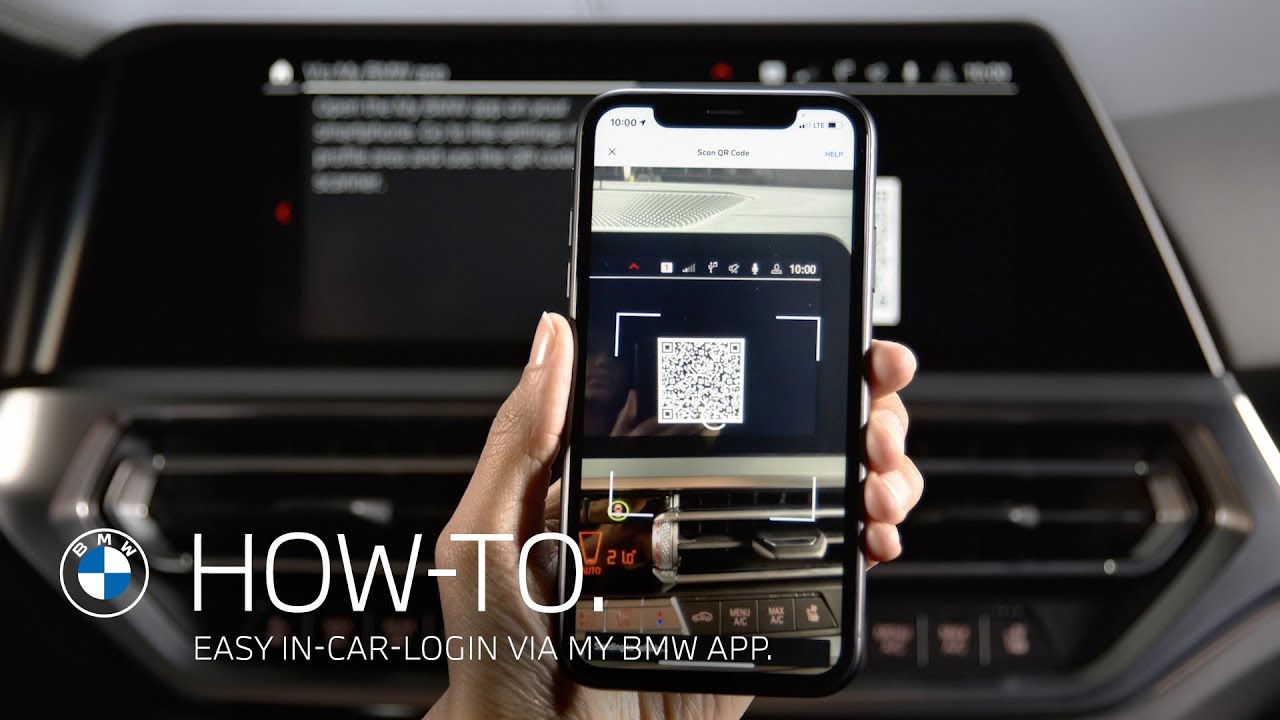
In this video BMW How-To will show you, that with the new My BMW App and BMW Operating System 7 or higher, it is even more convenient to create a personal driver profile in your or any other BMW by scanning a QR code. The personal driver profile allows you to save, synchronize and restore your personal settings any time. To create a new driver profile with the My BMW App, click on the profile icon in the status bar and select “Add driver profile”. Select “Via My BMW app”. A QR code will appear. When opening the My BMW app, by pressing “Profile”, “Settings”, “Scan QR Code”. The integrated QR Code scanner opens. You can also use your smartphone camera or any other QR Code scanner. After scanning the QR Code on the Central Information Display, your BMW ID is sent to the BMW and your driver profile is loaded.

Check out the other videos in the BMW How-To Series and be sure to leave us your feedback in the comments below.

The BMW Driver’s Guide app specifically describes the equipment and functions included in the vehicle. The Owner’s Handbook is available as an app in many countries. You will find further information on the Internet at: https://www.bmw.com/bmw_drivers_guide

► Explore More Videos:
How to connect your BMW to the My BMW App – BMW How-To https://youtu.be/E9HzJxyBpao
How to activate a driver profile with your vehicle key – BMW How-To https://youtu.be/TzUjp2S1mbg
How to personalize the dashboard – BMW How-To https://youtu.be/-eiLgqelitA

► Follow BMW on Social Media:
Instagram: http://b.mw/instagram
Facebook: http://b.mw/facebook
Twitter: http://b.mw/twitter

BMW Sheer Driving Pleasure
Add driver profileAppbmwBMW ConnectedDriveBMW IDBMW Operating System 7Can I log in to my BMW with my smartphoneCopy settings BMW guest profileDriver profileEasyElectric CarsElectric VehiclesEVguest profileHowToidriveInCarKey fobLinkLive Cockpit ProfessionalLog in BMW Credentials My BMW ApploginMy BMW AppPersonal Driver ProfilePersonal driver settingsPersonal PINPersonal SettingsQR codeQR Code scannerSmartphone cameraSynchronizationTransfer BMW ID with a QR Code smartphoneVehicle KeyvideosvlogYouTube

Related Posts

CES Challenges: Arki Technology vs Brad Canning and the new BMW iX3.

CES Challenges: Arki Technology vs Brad Canning and the new BMW iX3.

January 10, 2026
Braking so soft, you can’t tell you stopped?!

Braking so soft, you can’t tell you stopped?!

January 10, 2026
What’s the *wildest* thing you can power with a car 🔌

What’s the *wildest* thing you can power with a car 🔌

January 9, 2026
Being #GENM takes many forms.

Being #GENM takes many forms.

January 9, 2026
BMW Panoramic iDrive with Operating System X | Basic Setup | BMW How-To

BMW Panoramic iDrive with Operating System X | Basic Setup | BMW How-To

January 9, 2026
Card games ❌ Car games ✅

Card games ❌ Car games ✅

January 8, 2026

Write A Comment

You must be logged in to post a comment.

  • Twitter

© evshift.com

Top

    Type above and press Enter to search. Press Esc to cancel.