January 31, 2026
By Not a Tesla App Staff
In this article, we’ll take a look back at Tesla’s V11 prototype, the long-awaited update that would refresh the Tesla user interface and bring new module features to Tesla’s OS.
The update was expected around the holiday, similar to other big updates that Tesla had released in the past, such as v9, and v10.
However, before the update could reach production, it was leaked online by someone who found a Tesla-owned vehicle with a drastically different interface. While we don’t condone leaks, the excitement of seeing an updated UI excited many of Tesla’s fans.
This was back in 2021, and looking back, this was clearly a prototype that was never destined for production. For whatever reason, Tesla decided against this module design and instead later shipped a toned-down version of what we initially saw.
The New UI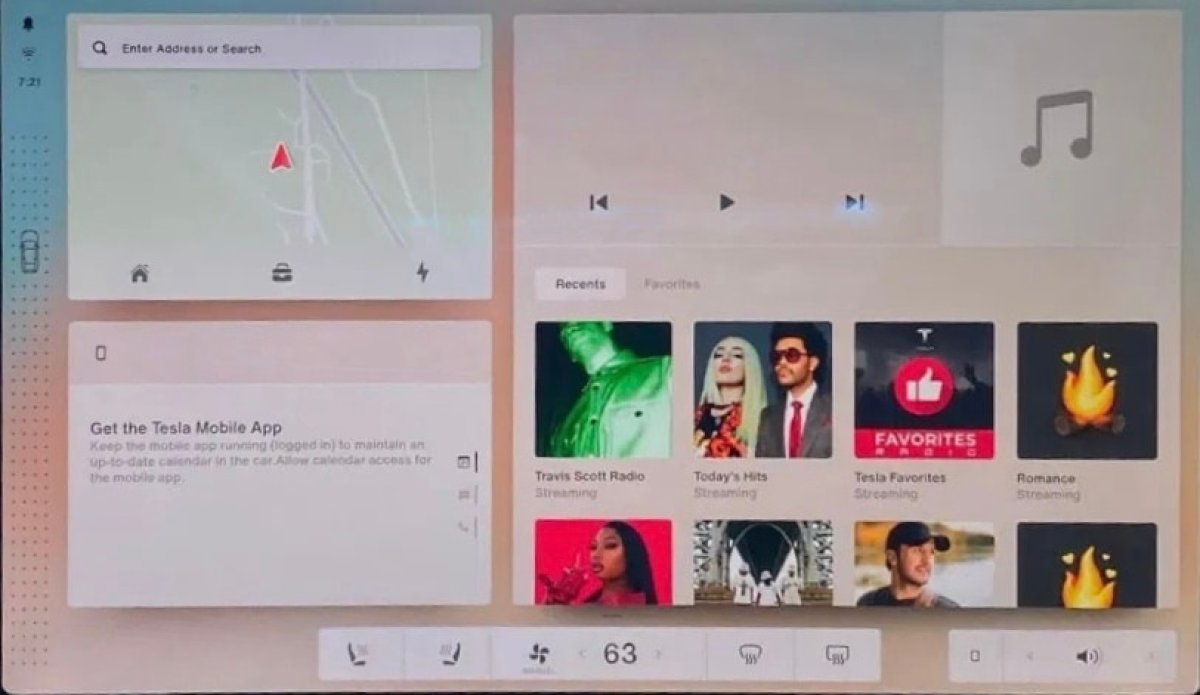
The leaked UI was such a drastic departure from Tesla’s interface at the time that it sent shockwaves through the Tesla community. The interface itself was driven by a very programmatic approach, allowing users to resize apps and add them to their home screen. Each app is responsive, letting users pick their preferred size and place it on the screen. You’d presumably be able to have one large app on the screen, multiple smaller widgets, or any combination of sizes.
The entire concept appears to be centered around customizability.
For example, in the photo above, you can see the smaller Maps widget on the top left with quick icons for Home, Work, and Charging. On the bottom left, you have the old Phone app, which lets you switch between Calendar, Messaging, and Phone. These have since become separate apps, but their functionality is essentially the same.
On the right side of the screen, you have the larger media player. These apps are similar to what we have today, but the biggest difference is that users can run more than one app at once and customize their sizes and placements on the screen.
Near the bottom of the screen, between the apps and the dock, you can see a horizontal line, which likely means that users could have multiple home screens, much like a phone. This would let users set up multiple pages with their preferred apps and widgets. One page could be for driving, another one for picking music, another to use while parked, etc.
While Tesla’s UI has come a long way since this prototype was shown, some of these concepts still sound great, even five years later. We’re still largely stuck running one app at a time, with no way to customize how it looks on the screen.
Dock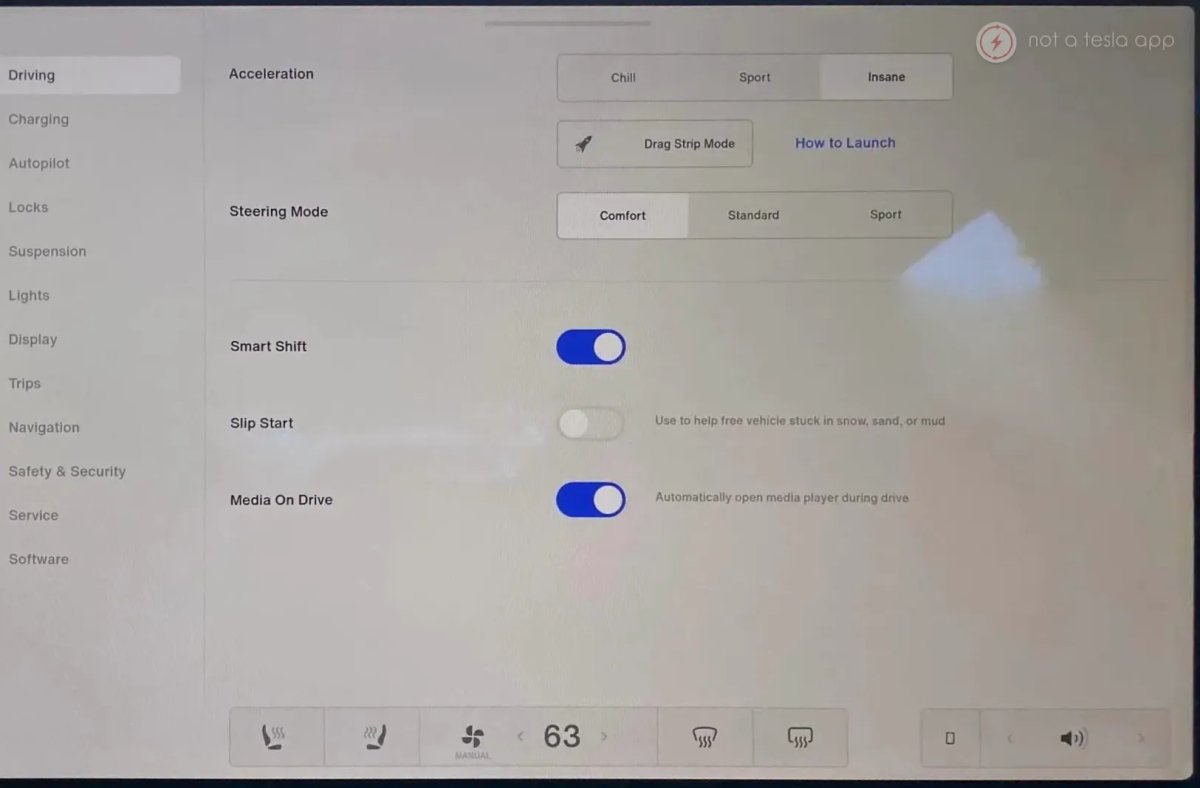
Back in 2021, there was no such thing as a customizable dock, so one of the first noticeable items in these photos is the customizable dock at the bottom. It appears you can add or remove apps from this dock, as several key apps like the media player, Energy, and others are missing, presumably because they weren’t added.
What was finally released in v11 was a less customizable but more refined version of the Tesla dock. While it initially removed key options like seat heaters, Tesla later made it possible to add them back to the dock in a subsequent release. Today, we’re able to add favorite apps to the dock, while some space is reserved for permanent icons like Controls and Sound, and Tesla fills in the rest with recently used apps.
In this concept, users appear to have complete control over adding or removing apps from the dock and their location within the dock.
The dock itself hovers above the other UI components and doesn’t fill the full width of the screen like it does today. This allows apps and menus to appear behind the dock, letting them display more information on screen.
Unfortunately, we never saw how you get to other apps and we may never see it. It could have been the square-like icon next to the volume button that served as an app drawer, or that could simply have been an icon for the user’s phone app.
Vehicle Controls
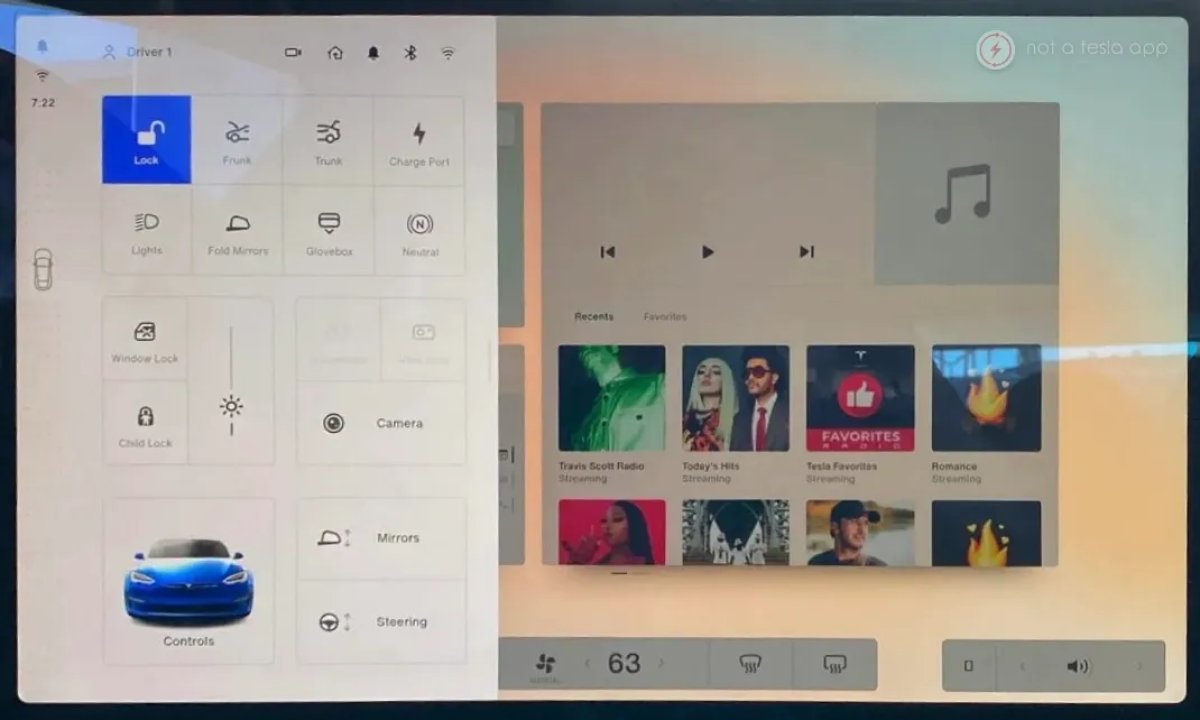
Notably absent is the car icon in the bottom-left corner, which houses all of the vehicle settings. Instead, Tesla is leveraging the car icon on the left side of the screen, which is also used to shift the car from Drive to Reverse. Tapping on it reveals the vehicle’s controls.
While it’s not clear, the grid-like layout of these icons in the Quick Controls menu suggests these options may also have been customizable. You can see icons such as Lock Car, Frunk, Trunk, Neutral, and others that are typically not part of Quick Controls. While this would have been a really nice addition, we don’t know whether this area was actually customizable.
To access the vehicle’s full set of controls, you’d actually tap the car icon in the bottom left corner in this Quick Controls section, which will then open up the full Controls menu.
A nice touch here is that when the user taps on the car icon on the left, all the widgets on the “home screen” are zoomed out and dimmed. There was careful attention to detail here, and it seems Tesla may have been working on this for a while before it was scrapped at the last minute.
Visualization
Notably missing are the vehicle visualizations. Since this was observed on a Model S, the visualizations are displayed on the instrument cluster rather than the main screen. On a Model 3 or Model Y, the visualizations could have been their own widget that could be expanded to different sizes or even hidden completely. Unfortunately, the UI was never seen outside of the Model S.
Status Bar
In this prototype, the icons in the status bar were moved to the left bar on the left, and the rest of them only appear when you open Quick Controls. This is similar to the final version of v11, which removed most icons from the status bar and showed them only when the user went to Controls.
Release
When this prototype was leaked in March 2021, many users thought that it would eventually arrive in their vehicles. However, this never materialized, and the UI was never seen outside of this isolated incident. One day, we hope Tesla will share the story of this v11 prototype.
What Tesla eventually released was seen as a watered-down version of this prototype. While it did include a customizable dock, it lacked many of the features we saw here, including responsive apps and the ability to customize multiple home screens.
This software was running on a Model S with MCU 3 (AMD Ryzen), but Tesla didn’t transition the Model 3 and Model Y to MCU 3 until December of that year. Part of the decision not to release this software could have been that it wouldn’t be available on slower, Intel-based vehicles, would segment the market, and would require Tesla to support two different user interfaces.
While the concepts in this prototype are exciting, features such as the customizable dock seem less polished and user-friendly than what Tesla eventually released. While power users would love more control, Tesla is now a mass-market vehicle that needs to be as user-friendly as possible and to appeal to a wide array of customers.
Future Features
While this prototype is clearly not going to be released at this point, some of the ideas behind it are still intriguing. Tesla could one day release features similar to those we saw here, allowing users to resize their apps and run multiple apps at once.
Toss in the ability to add multiple home screens and for different users to have varying layouts, and this becomes an extremely customizable experience. Here’s hoping Tesla reconsiders some of these features for the new UI overhaul.
Subscribe to our newsletter to stay up to date on the latest Tesla news, upcoming features and software updates.
January 30, 2026
By Karan Singh
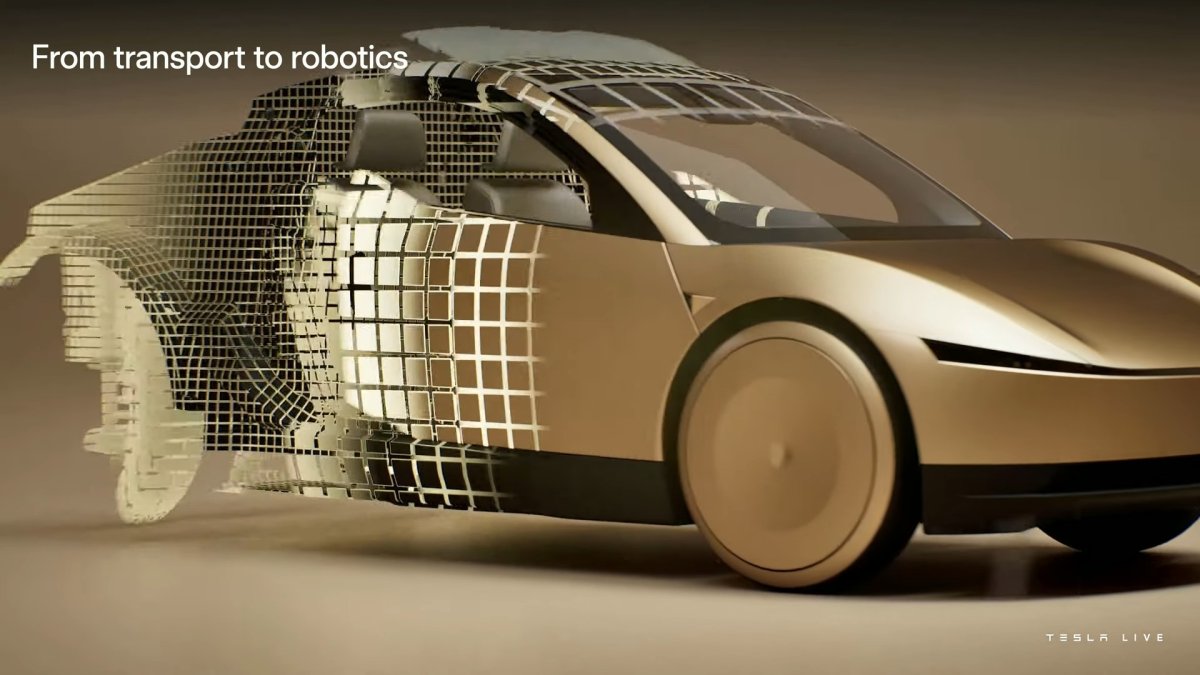
With the latest release of the Tesla app, we went on a deep dive to find what secrets Tesla had hidden in there, and we found one that’s rather interesting. The Cybercab will not just feature steer-by-wire like the Cybertruck, but also true Brake-by-Wire.
Code strings discovered in the app include specific references to “Brakes SW – Brake-by-Wire (Cybercab)”, confirming that Tesla’s latest vehicle will abandon the traditional hydraulic link between the pedal and the calipers.
What is Brake-by-Wire?
In a traditional car, pressing the brake pedal mechanically actuates a master cylinder, which uses hydraulic pressure to force brake fluid through the system and clamp the brake pads against the rotors.
In a brake-by-wire system, there is no direct physical connection between the brake pedal and the brakes themselves. Instead, pressing the pedal sends an electronic signal to a computer, which then commands electric actuators—or a centrally controlled electric brake system—to apply braking force at the wheels.
This mirrors the Steer-by-Wire system on the Cybertruck, in which the steering wheel has no physical linkage connecting it to the wheels.
The Cybercab is currently manually driven, meaning it has pedals that activate the electric signal to brake the vehicle. However, in an autonomous, pedal-less vehicle, this change makes a lot of sense. There’s simply no need for all of these extra parts. This not only reduces failure points in mechanical components but also lowers the cost of producing the vehicle.
Cybercab vs Refreshed Model Y
This discovery highlights another key difference between Tesla’s consumer vehicles and its next-gen Robotaxi.
The Refreshed Model Y features a sophisticated hybrid braking system that uses two master cylinders. The primary cylinder is an electronic cylinder, software-controlled for smooth regen blending and braking on FSD. The secondary cylinder is physical, connected to the actual braking system.
This is what allows Tesla to increase vehicle efficiency with the new braking system in the Model Y. It allows the vehicle to selectively use regenerative braking, even when the user presses the brake pedal. When the driver taps the brakes, the vehicle can decide whether to use the physical brakes, use regenerative braking, or a blend of the two.
In other Tesla vehicles with a single master cylinder, regenerative braking is applied only when the driver lifts their foot off the brake pedal. As soon as the driver taps the brake pedal, the vehicle’s physical brakes kick in.
While the Model Y can and does brake electronically, it still retains a physical mechanical link to the brakes as a fail-safe.
The Cybercab, however, is logically ditching the physical link entirely. Since the production Cybercab will have no pedals, there is no need for a mechanical backup loop for a human driver. Instead, the vehicle will likely rely on redundant power sources and motors to ensure the brakes can always engage, even if one electrical circuit fails.
Why Does This Matter?
We all know the Cybercab won’t have any pedals, so there aren’t any physical controls to brake with. So what’s the big deal?
Moving to full Brake-by-Wire offers three massive advantages for Tesla’s current Model Y robotaxis. By eliminating the brake pedal, vacuum boosters, and a firewall-mounted master cylinder, Tesla can reclaim additional interior space for passenger legroom. In addition, the fully electronic system can seamlessly blend regenerative braking (using the motors) and friction braking (using the discs) to achieve even smoother stops.
But the best part is fewer parts. Fewer hydraulic lines mean less fluid maintenance and fewer points of mechanical failure over the vehicle’s intended service life, which is going to be absolutely key for a Robotaxi.
January 30, 2026
By Karan Singh
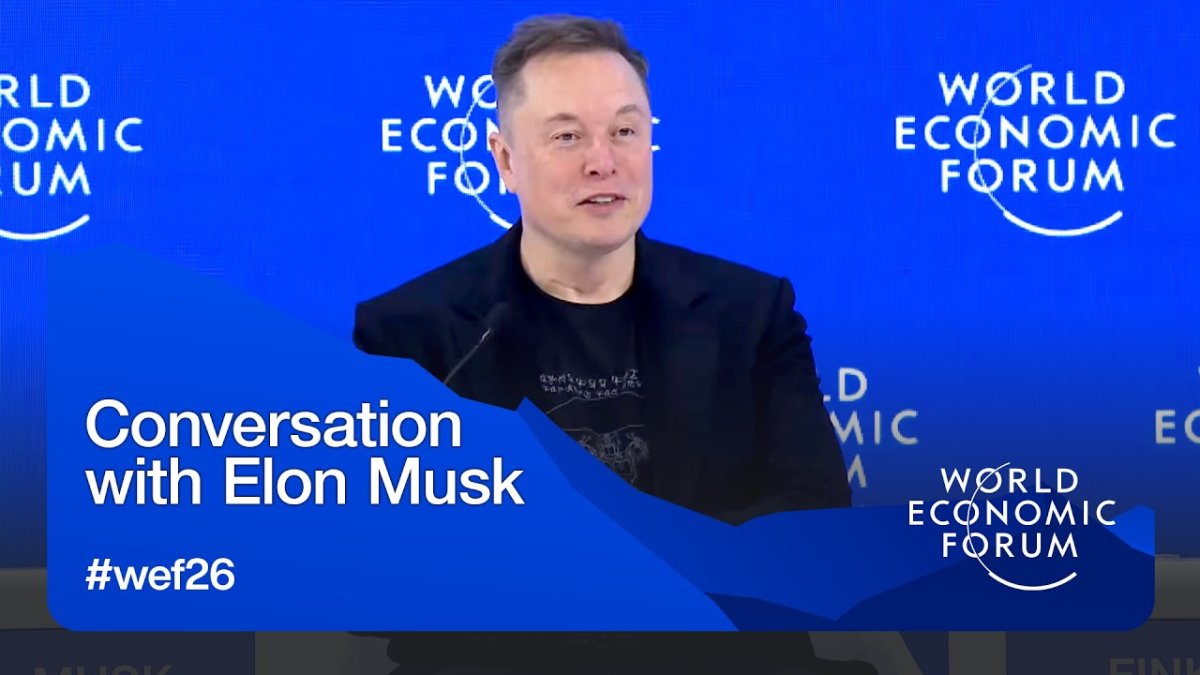
In a wide-ranging conversation at the World Economic Forum (WEF) in Davos last week, Elon Musk laid out a revised roadmap for humanity’s future – one that includes a new mission statement for Tesla, a massive domestic solar initiative in the US, and a concrete timeline on progress with Optimus, Tesla’s humanoid robot.
Tesla’s Mission: Sustainable Abundance
For years, Tesla’s mission has been etched in stone: To accelerate the world’s transition to sustainable energy. With the release of Master Plan Part IV last year, the mission shifted to one that is even broader and larger.
Sustainable Abundance.
Elon Musk on Tesla’s new mission: pic.twitter.com/jh1on5FydO
— Sawyer Merritt (@SawyerMerritt) January 22, 2026
At Davos, Elon spoke to the broadening of Tesla’s mission to change the world. While sustainable energy addresses the climate crisis, sustainable abundance addresses the economic crisis. The path to this future, he argued, is paved by AI and robotics. If labor becomes ubiquitous and essentially free by humanoid robots and advanced AI, the cost of goods and services collapses.
Hopefully, this will lead to an era in which poverty is eliminated because everything becomes affordable. While many might dismiss this as a pipe dream, longtime fans of Elon might have noticed something. This felt like the return of a focused Elon, from 2018, with a grand vision and goal, dead set on making it happen.
If anyone can make Sustainable Abundance happen, it’s Musk.
Optimus For the Masses in 2027
But how do we get to that abundance? As mentioned, humanoid robots. At WEF, Elon also provided his most specific timeline to date for Optimus’s arrival.
Today, Optimus bots are currently working on the factory floors, performing simple tasks in Tesla’s factories. By the end of this year, they will be performing more complex tasks across a wider range of industrial environments. By the end of 2027, Tesla will prepare to open sales of Optimus to the public.
Elon noted that his 2027 target depends on achieving a very high level of reliability and safety, but he remains confident that robots will eventually outnumber people.
100 GW of Solar in the US
In a shift of the discussion to energy infrastructure, Elon announced a massive new manufacturing initiative involving both of his primary companies – Tesla and SpaceX.
Addressing the energy constraints of the AI boom, Elon stated that Tesla and SpaceX are separately working to build 100 gigawatts (GW) of annual solar manufacturing capacity within the United States. The goal is to have that production capacity up in about 3 years.
For context, the entire US grid currently has a total generating capacity of roughly 1,200 GW. Adding 100 GW of annual solar generation capacity would fundamentally alter the U.S. energy landscape. A solar array measuring just 100 x 100 miles in a sunny corner of Nevada or New Mexico could sustainably power the entire United States – expand that slightly, and you could power all of North America.
Space-Based AI
Continuing on the topic of AI and energy, the most sci-fi concept of the Davos discussion was Elon’s solution to the heat and power limits of AI data centers – putting them into orbit.
Elon noted that SpaceX is already working on plans to launch solar-powered AI satellites within the next few years. The logic is simple. Solar panels in space generate ~5x more energy than on Earth. Depending on satellite positioning, there won’t be any nighttime, but most importantly, there are no clouds or atmosphere to contend with either.
By radiating waste heat into the vacuum, an effectively infinite heat sink, you simply eliminate one of the largest requirements of terrestrial data centers, cooling.
The lowest cost place to put AI will be space.
Closing Words
Elon closed the session with a reflection on his own philosophy, urging world leaders to choose hope over cynicism.
“My last words would be: I would encourage everyone to be optimistic and excited about the future. For quality of life, it’s better to err on the side of being an optimist and wrong rather than a pessimist and right.”
If you want to watch the entire keynote discussion, you can watch it on YouTube right here.