How To Operate Climate Control | MINI How-To
[Music] Your Mini’s climate control is designed to keep you perfectly comfortable with intuitive digital controls located right in your center display. Adjusting your cabin temperature is easy. Too hot, too cold. Adjust the temperature by tapping the red or blue arrow. Warmer or cooler, your Mini responds instantly. Need a little extra comfort? Just tap the temperature number and if equipped, you can adjust the heated seats or steering wheel from the same screen, keeping you comfy and cozy. Want more control? Tap the fan icon to adjust air flow, fan speed, or vents manually. Prefer to let Mini handle it? Just press auto and your Mini will automatically regulate the interior temperature as well as steering wheel and seat heating intelligently for the drivers and the passenger side. Even smarter, your Mini can remember what you like. In the climate control menu, tap settings to access the automatic program for your seat and steering wheel and your passenger seat, too. Turn features on or off and fine-tune preferences so your Mini stays one step ahead without any surprises. Even easier, use the Mini intelligent personal assistant. Just say, “Hey, Mini, set the temperature to 68° and enjoy hands-free comfort.” Temperature set to 68°. Simple, smart, and always in control. Mini Climate Control puts comfort in your hands so you can mini and chill mile after mile. Level up your mini know-how. Check out the full mini how-to series and discover what else your mini can do.
Your MINI’s Climate Control is designed to keep you perfectly comfortable.
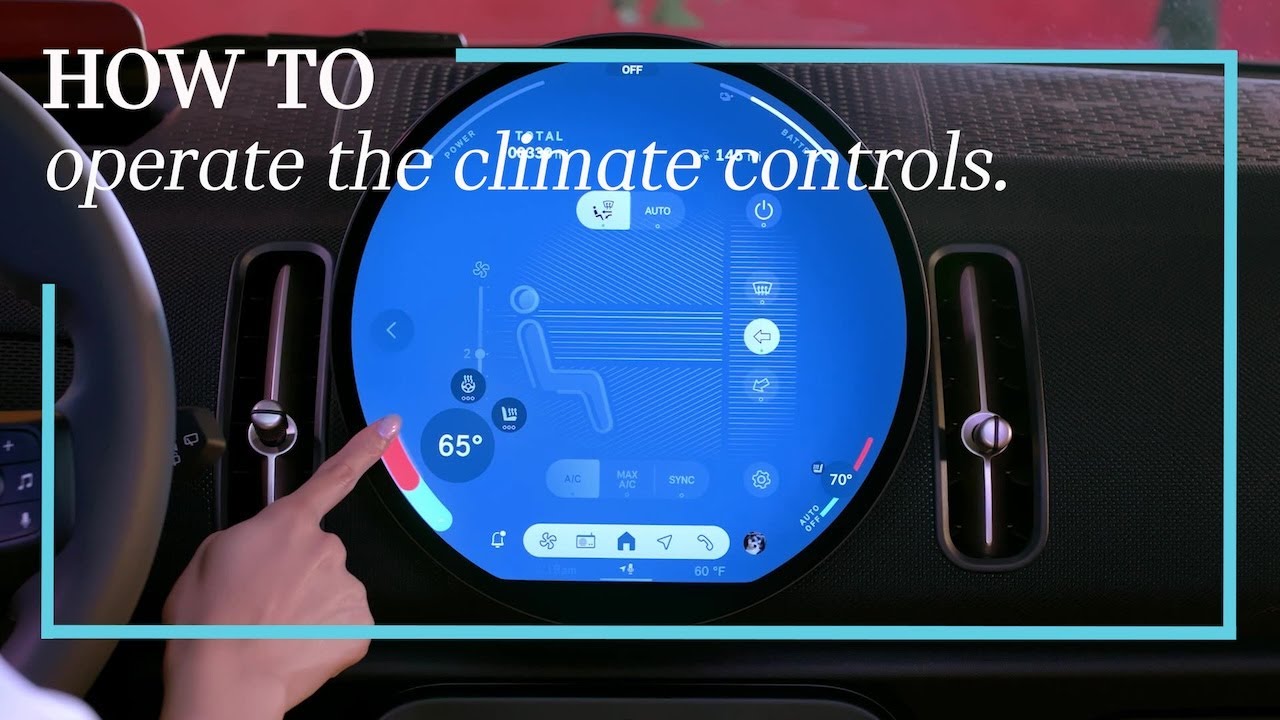
With intuitive digital controls located right in your center display, adjusting your cabin temperature is easy.
Too hot? Too Cold? Adjust the temperature by tapping the red or blue arrow. Warmer or cooler—your MINI responds instantly.
Need a little extra comfort? Just tap the temperature number, and if equipped, you can adjust the heated seats or steering wheel from the same screen, keeping you comfy and cozy.
Want more control? Tap the fan icon to adjust airflow, fan speed, or vents manually.
Prefer to let MINI handle it? Just press Auto and your MINI will automatically regulate the interior temperature as well as steering wheel and seat heating intelligently for the drivers and the passenger’s side.
Even smarter, your MINI can remember what you like. In the Climate Control menu tap settings to access the automatic program for your seat and steering wheel, and your passenger seat, too. Turn features on or off and fine-tune preferences so your MINI stays one step ahead, without any surprises.
Even easier, use your MINI Intelligent Personal Assistant. Just say “Hey MINI, set the temp to 68 degrees” and enjoy hands-free comfort.
Simple, smart, and always in control. MINI Climate Control puts comfort in your hands so you can MINI and chill, mile after mile.
Level up your MINI know-how. Check out the full MINI How-To series and discover what else your MINI can do.
Looking for a quick answer? Check out our FAQ site: https://faq.miniusa.com/
Refer to your owner’s manual or visit: https://www.miniusa.com/owners/tools-support/owner-manuals.html
Need further help? Contact us here: https://www.miniusa.com/footer-navigation/contact.html
Stay updated:
Official Website: http://www.miniusa.com/
Facebook: https://www.facebook.com/MINIUSA
X (Formerly Twitter): https://x.com/MINIUSA
Instagram: https://www.instagram.com/MINIUSA
YouTube: https://www.youtube.com/user/MINIUSA