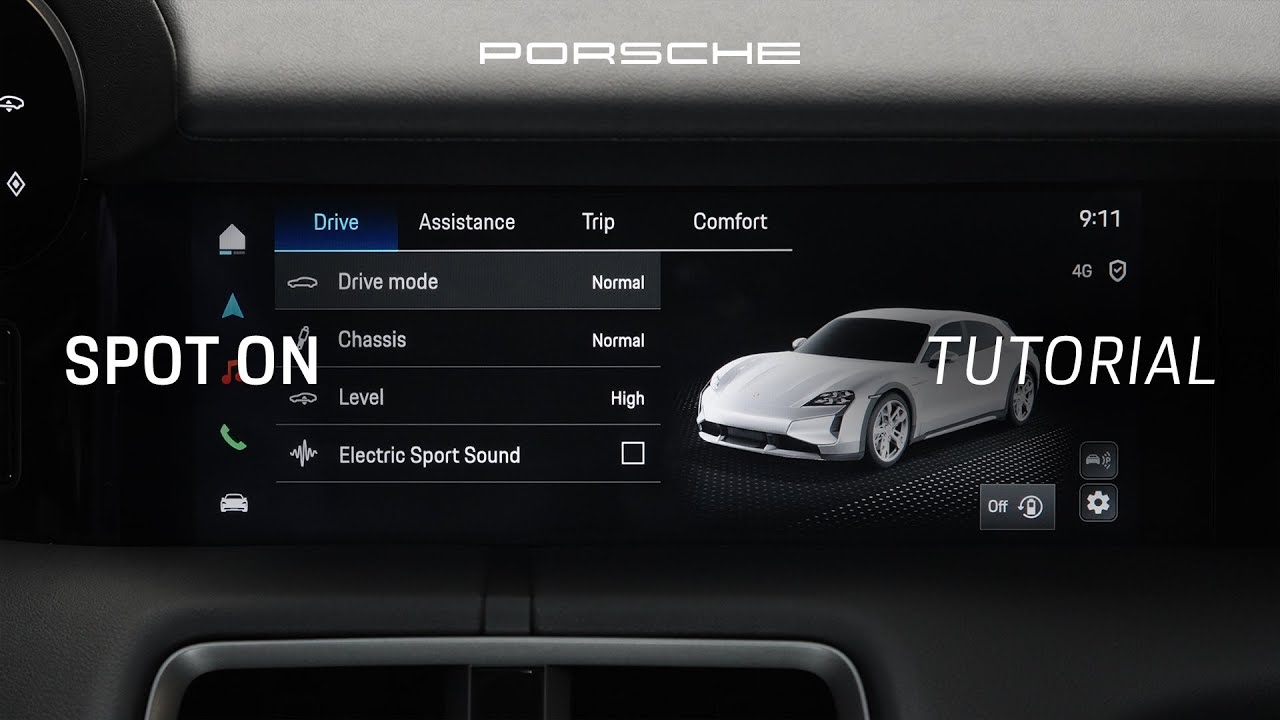
Explore and learn how to customise drive modes in the Porsche Taycan | Tutorial | Spot On
In this video, I will show you how the drive modes and the drive mode switch work and how you can customize your drive modes in the Porsche Tyon. Check it out. The drive mode switch allows you to easily change the drive mode without having to call it up on the PCM, sharpening the driver’s focus even further. The switch is located here on the right hand side of the steering wheel. Formally, the drive mode switch was part of the sports chrono package. The new TYON starting 2024 receives the drive mode switch as part of its standard outfit. Starting with the TYON 4S and in combination with the performance battery plus and the sports chrono package like this one here, additionally receive the pushto button here in the center. In the TYON Turbo GTs, this function is called attack mode. The pushto pass button derived from motorsports delivers a short but serious power boost. The boost lasts 10 seconds and upon pressing it, you will get a countdown timer here in the tube. This is very useful when overtaking. It’s also great fun, but fair warning, the boost is really powerful. Now, let’s talk about the different driving modes. The TYON can have up to five driving modes. Normal is set for everyday use and a good balance between performance and efficiency. The moment I turn the switch, the drive mode selection jumps into the right tube here. Range offers maximum efficiency and consumption optimized driving. Switch to sport, the Tyan’s natural personality. The sport mode is for higher performance and higher dynamics. Next, the sport plus mode, which is available with a sports chrono package. Now, go for sport plus when you really wish to feel what the Tykan is capable of with major performance. Last but not least, the Tyken Cross Turismo exclusively offers the gravel mode for driving on rough roads. You’ll notice that as soon as I turn the drive mode switch, the drive mode selection will pop up in the PCM. Here you have quick access to settings such as chassis and the electric sport sound. Let’s say you are on a street with poor road surface. While in the drive mode, sport, I can quickly adjust the chassis to normal. Keep in mind that this adjustment is only temporary. These settings can also be accessed via the drive menu in the PCM. You will have the option to also adjust your driving mode for either temporary or permanent use. Let’s say I want to enjoy some music while driving. I can turn off the electric sport sound. To save this adjustment permanently, simply press the check mark next to the driving mode and any changes you have made will be memorized. You can always change them back at any time or even reset all drive modes back to default settings. You can do this here. As you can see, you can easily adapt the drive modes to suit your driving style. The only drive mode that cannot be modified permanently is the normal drive mode. Also, you may have noticed that the individual drive mode is no longer displayed in the options. This is because it has been integrated into the other drive modes and is no longer necessary. Now you know how the drive modes and the drive mode switch work and how to personalize your driving modes with the new TYON. Enjoy driving your Porsche and see you in the next video.
Join Bijon as he shows you how to get the most out of your Taycan with the different drive mode options.
00:00 Intro
00:14 The drive mode switch
00:40 The Push to Pass button
01:16 The different driving modes
02:28 Accessing the driving setting
03:18 Outro
► Watch more Spot On videos: https://porsche.click/SpotOn_YT
__
Taycan Turbo (WLTP): Electrical consumption combined: 20.0 – 17.7 kWh/100 km; CO₂ emissions combined: 0 g/km; CO₂ class: A;
Taycan Turbo GT with Weissach package (WLTP): Electrical consumption combined: 20.8 – 20.6 kWh/100 km; CO₂ emissions combined: 0 g/km; CO₂ class: A; Status 09/2025
Follow Porsche on Instagram: https://porsche.click/2R1FOPM
Like Porsche on Facebook: https://porsche.click/3dFSRQs
Follow Porsche on TikTok: https://porsche.click/3AHZ4aQ
Follow Porsche on Twitch: http://porsche.click/3deSdsi
Subscribe to Porsche on YouTube: https://porsche.click/2WWDxZZ
Visit the Porsche Website: https://porsche.click/2yprQAR