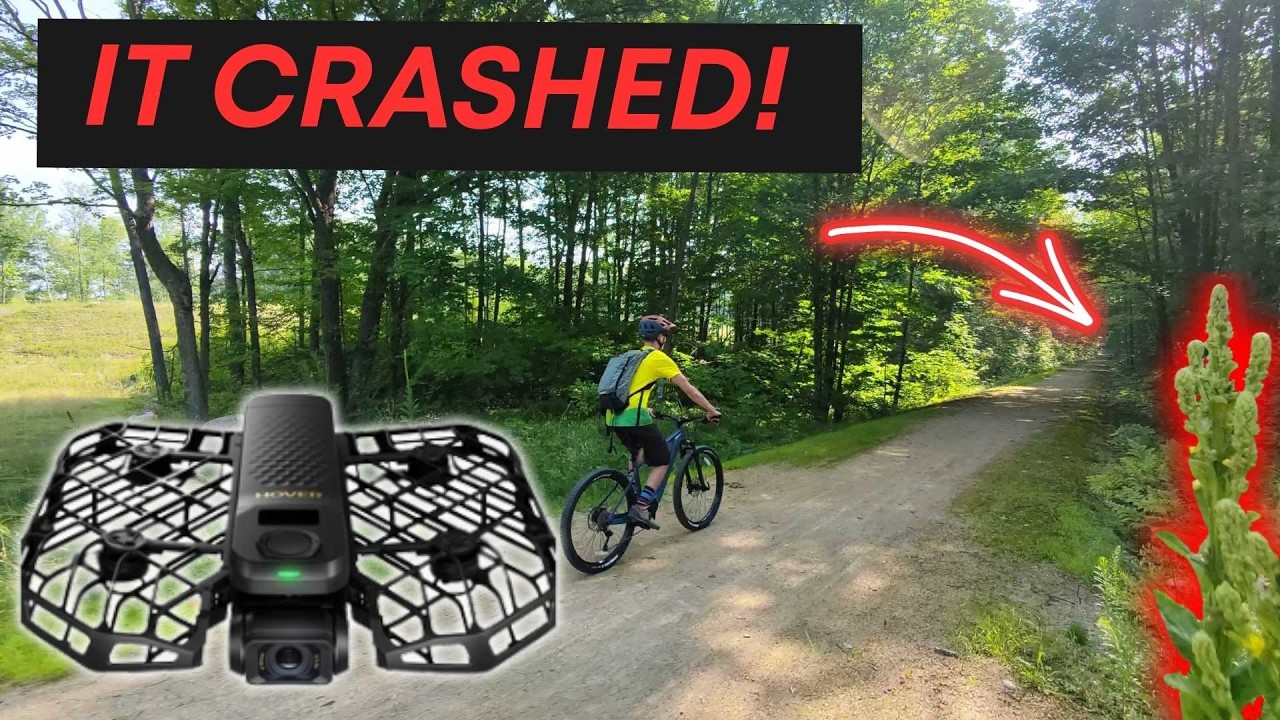
HoverAir X1 ProMax Review: Why This Changed My Mind on Drones
Oh my Oh my god. Oh my. I have been so reluctant to add a drone as part of our equipment for filming our ebike reviews because I crave simplicity so much. But this might be the ticket. This is the Hover Air Pro Max and they claim it’s easy to use. Usually I’m just pressing the record button on a GoPro or Insta 360. That’s how we make our reviews happen. But now I’m stepping out of my comfort zone. I have no drone experience whatsoever. All I’ve done is charged up the batteries and downloaded the app. And then we’ll have some mini challenges. Can I really launch this drone with a push or a tap of a few buttons on my phone? Will it track me on a fast ebike ride without losing me? And can my son fly this himself without crashing it? he thinks it’s his. The goal though, just awesome shots of us riding ebikes. Let’s not waste any time and stick around to the end of the video where I’ll give you the pros and cons of the Hover Air Pro Max. And by the way, Hover Air did provide this so I could create a review video. They didn’t pay for this. They have no control over what I’m saying. I just want to give my honest opinion because I think this might just be the best option. So, first off, pricing on the X1 Pro Max is currently $6.99. I’ll throw an affiliate link in the description in case you want to support our efforts. Though, yes, you’re likely to spend more than that with some of their accessories. More on that later. You can save a bit certainly with the X1 Pro, which is $4.99. It does step down the resolution. The real awesome thing about this drone is it’s insanely small, lightweight, and it folds. So, is this drone as easy as pushing a button? So, to start off, the app walks you through getting to know your drone and really holds your hand through the flight paths that it offers. There are even some that need to be unlocked after running a certain amount of test flights. This is a really nice way of getting you acquainted with the drone, especially for new drone users like myself. Pretty soon though, you’ll get the hang of it. Simply hold the drone in your hand, change any settings you want, and push the button, and it will fly its flight path. We were very quick to see how well it can follow an electric bike. And next is this drone. Easy enough that my son can use it. And how does it follow someone? All right, so now go to the side. Run to the side. Oh, there you go. Now run around. All right, let’s see if it can follow. Keep running, Lenny. Oh, I think it’s working. All right, come back. Oh. All right. Come by me and let’s All right. Put your hand out. Hey, can a 5-year-old do it? Yes. All right. At this point, I’ve been using this extensively. Every single review from electric trikes to electric mountain bikes. I’ve landed on a few flight modes and have customized them to meet my needs. Let’s start off with some of the more basic ones and then I will get to the ones that are just downright impressive. We’re always looking to get these side profile shots when we’re reviewing electric bikes without having a separate camera person. The 360 camera does a fairly decent job, but this does a much better job. And so Sidetrack gives us that nice side view perspective. So you can see the bike, you can see me riding the bike, so you have an idea of how it might fit. And with the drone, you can just get further away shots. I’ve been using the far distance because that just gives us the additional perspective. And either having the altitude set to high or flat, offers some variation for still using a side view shot. Dolly track is another one that I’ve been using pretty extensively. And this is the shot where I’m on the bike and I hold the drone out in front of me and then it stays flying in front of me. And again, using that flat shot. I do like the high altitude with this shot as well. And what’s great is it adjusts the speed. If I start pedaling faster, the drone is going to fly further back to give me still that shot. And what’s great about Dolly Track is because I’m swerving around on the bike. It actually can give me different shots, not just one that’s straight out in front of me. It adds some variability to some of our shots. The next is cycling mode. Obviously, we use this one and this is the most impressive. Now, it does have follow and that works incredibly well. It’s actually amazing how it can follow one person, even in a group of people. Once it seems to lock on to you, even if there’s other people running around, it can still follow you. But cycling mode is more suited to cycling. You can set it to open areas, which I have done. I’ll do that when I’m riding in a more urban environment. But the narrow routes for mountain biking on single track, yes, with trees on both sides is so impressive. I’m not sure how it does such a good job at making sure it doesn’t run into things, but it does it. You might actually notice in some of this footage that I keep looking back to make sure the drone is okay because again, it’s just so surprising. Everyone who has witnessed the cycling mode on narrow routes on the single track is downright impressed that it’s literally a drone just following me around, not crashing into things. And that’s just me holding it out, pushing the button, and then just going for a ride. Now, with some of these settings, it’s worth noting that the way you actually bring the drone back and the way it knows that it should come back, you can do that within the app a little bit, but what I find easiest is you just put your hands in an X and it will slowly come towards you. You put your hand underneath it, it recognizes your hands there and then we’ll safely land. I’ve also played a little bit around with orbit, though I need to be more mindful of my surroundings. That’s when the drone actually does a 360 around you. That can give you an interesting perspective of the bike in our use case. Bird’s eye gives a nice perspective. It could be nice for some B-roll, though. I happen to live very close to an airport, so I need to be certainly mindful of that. And for those looking for a more unique shot, I’ve been using dolly zoom a little bit. Just gives a little bit of a warped perspective when you use that one. But moving forward, for simplicity purposes, I see us using that side track, dolly track, and then cycling mode. That’s going to give us all the angles that we really want for our review videos. All right, pros and cons time. This is certainly one of those instances when I think, why didn’t I get this sooner? I’m not aware of another drone on the market like this. It seems like it was designed for my use case. Everything I would want in a drone feels like it’s in here. That starts with it being just simple to use. Put it in your hand, select what flight path, and hit the button, and you’re pretty much good to go. For my purposes, one of the huge benefits is just it is so incredibly small. I didn’t even talk about this cage, but it’s extremely durable. They actually give you a sample so you can try to break it, but you can’t. So, I can just put this in a pocket, maybe a fanny pack. If I have to go on a flight and film a review, I’m certainly going to bring this with me. It doesn’t take up much space at all. I have it in a nice carrying case with all the batteries as well as the charger. And because of that, it doesn’t disrupt my process of how I film review. Just bring this with me and as long as I have my phone, which I do, I’m good to go. Next, the app. It’s incredibly easy to use. In fact, I would recommend using the app over trying to select everything in here because you have an exact idea of what you have the settings set to, especially if you’re flying in areas where you maybe don’t have a ton of room. And so, I can film, say, a side track, change the altitude from flat to high to get that different shot. And it’s just connected with my phone, super easy. Next, the tracking is very impressive. The only issues I’ve had with it is if it’s not facing my face, it’ll say it can’t find the target. But once it gets into the air, I haven’t had it lose me yet. And my son loves that follow mode and it hasn’t lost him either. Also related to the app, they just keep making updates. I think I’ve had three firmware updates. They’ve gone flawless so far. They’ve even added a new flight mode. It’s called Spiral. I’ll probably be trying that one out. Next, for the considerations, it should go without saying that this is a drone and you need to be aware of your surroundings. Now, this does have a manual mode. You can actually control it with your phone. I actually found it pretty intuitive having never flown a drone before, but they also sell a separate control if you want full control. There’s tons of drones though with controls, so I don’t think that’s quite where the Hover Air is differentiated. It’s all about the pre-planned paths and flight modes. And so the best way to explain this in my opinion is picture yourself as actually the remote control for the drone. That means when you put it in Sidetrack, it’s going to fly next to you. So you need to kind of be aware, are there trees in the way? I know it has some rear accident avoidance, but if it’s in Sidetrack and there’s a bunch of obstructions to the side of it, it’s going to run into them. Probably the best example of this is when I was out on a double track trail. I had it in side track. I was aware of the distance and there’s just one tiny plant sticking up and the drone happened to hit it. No damage thankfully to the drone. And that’s just where you just need to be aware that it’s going to follow you. So in that instance, maybe I would have needed to go a little bit more towards the left to make sure the drone had more room to fly. Now, I’m also recording on the street, so I need to be very aware of cars because this is a small drone. Don’t want anyone to run into it. And so I highly recommend like I did, test out the distances. Do you want it closer to you? Can you fly it further away from you? Once you have those distances dialed down, that’s going to give you a good idea of how much room the drone is actually going to be away from you. Same with dolly track. When this thing is in front of me, I need to be aware of what’s in front of the drone so it doesn’t run into anything. And so if I see something coming up, I’ll just stop and the drone will stop. So that’s kind of how your body acts as a controller. It’s certainly something that takes getting used to, but now over 200 flights in, I’m pretty confident with this drone. Next, let’s talk about the battery. The battery is right here, easily removable. Just know that they have about 15 minutes of fly time. Of course, that’s going to depend a little bit on conditions, but for sure, this is where you need to budget a little bit more when you’re buying one of these because you’re going to want at least two batteries, I think, if not more. If you go out for longer periods of time, you’ll want even more. And once you’re down about 10 minutes, you probably want to swap the battery anyway. It’s kind of like range anxiety for electric bikes. Most people want to swap that battery out or charge up even though they have a little bit more range. You might also find that the charging hub is a good investment for an accessory as well. So, look, drones aren’t new, but the features of this are certainly differentiated. As I’ve said, I feel like this drone was made for me. I’m going to use it in every single review video. So, you’ll continue to see drone footage. I’ve spent thousands of dollars on Insta3s, GoPro cameras for our entire team, and it feels like a pretty modest expense for the additional shots we can get with this drone. You can check further details down in the description if you’re planning to pick one up, and this review helped. Using our link certainly helps the channel, I’ll be hanging out in the comments section, and I’ll also be updating it with any further thoughts as I continue to use the drone. Thank you so much for watching and I’ll see you in the next one.
HoverAir X1 ProMax (Amazon): https://amzn.to/4mFTz2Q
Discover the HoverAir X1 ProMax in this honest review from a total drone skeptic! I was reluctant to add a drone to my gear, craving simplicity, but this pocket-sized wonder changed everything. No prior experience needed—I just charged it, downloaded the app, and tested launches, tracking on fast adventures, and even let my 5-year-old try it.
Watch as I challenge it: effortless one-button flights, impressive follow modes (even on narrow paths without crashing), and customizable shots like side track, dolly track, cycling, orbit, and more. It’s small, lightweight, durable with a protective cage, and app updates keep improving it.
Pros: Super simple for beginners, amazing tracking, portable (fits in a pocket), great app, firmware enhancements.
Cons: ~15min battery life (get extras), be aware of surroundings, accessories add cost.
Electric bike accessories list: https://ebikeescape.com/electric-bike-accessories/
Top Ebike Brands – My Favorites: https://ebikeescape.com/top-ebike-brands/
Electric bike discount codes: https://ebikeescape.com/ebike-discount-codes-by-company/
Ebike Escape Store: https://shop.ebikeescape.com/
Ebike Escape: https://ebikeescape.com/
Rad Power Bikes Forum: https://www.radowners.com/index.php
Ebike Brands (Support the Channel!):
Lectric: http://lectricebikes.sjv.io/YgMaRm
Aventon: https://alnk.to/gzWk4Yp
Ride1Up: https://go.ride1up.com/aff_c?offer_id=1&aff_id=1005&source=youtube
Rad Power Bikes: https://radpowerbikes.pxf.io/1rmzzD
Velotric: https://alnk.to/hDqgcLo
Ariel Rider: https://lddy.no/r46u
Blix Bikes: https://alnk.to/gKRoDy2
Biktrix: https://lddy.no/wzo3
Flyer Ebikes: https://alnk.to/fShEyRf
Euphree: http://euphree.com/RYANEBIKEESCAPE
Vvolt: https://alnk.to/hswqyUK
Electric Bike Company: https://alnk.to/aWDXkVu
Heybike: https://heybikeinc.pxf.io/JKjL2v
We are a participant in ebike affiliate programs as well as the Amazon Services LLC Associates Program, an affiliate advertising program designed to provide a means for us to earn fees by linking to Amazon.com and affiliated sites.
#electricbike #ebikes