Master Climate Control in BMW Panoramic iDrive | BMW How-To
Here’s how to get quick and easy climate comfort in BMWs with Operating system X.
The new BMW Panoramic iDrive can regulate the airflow and temperature intelligently and optimized to your needs.
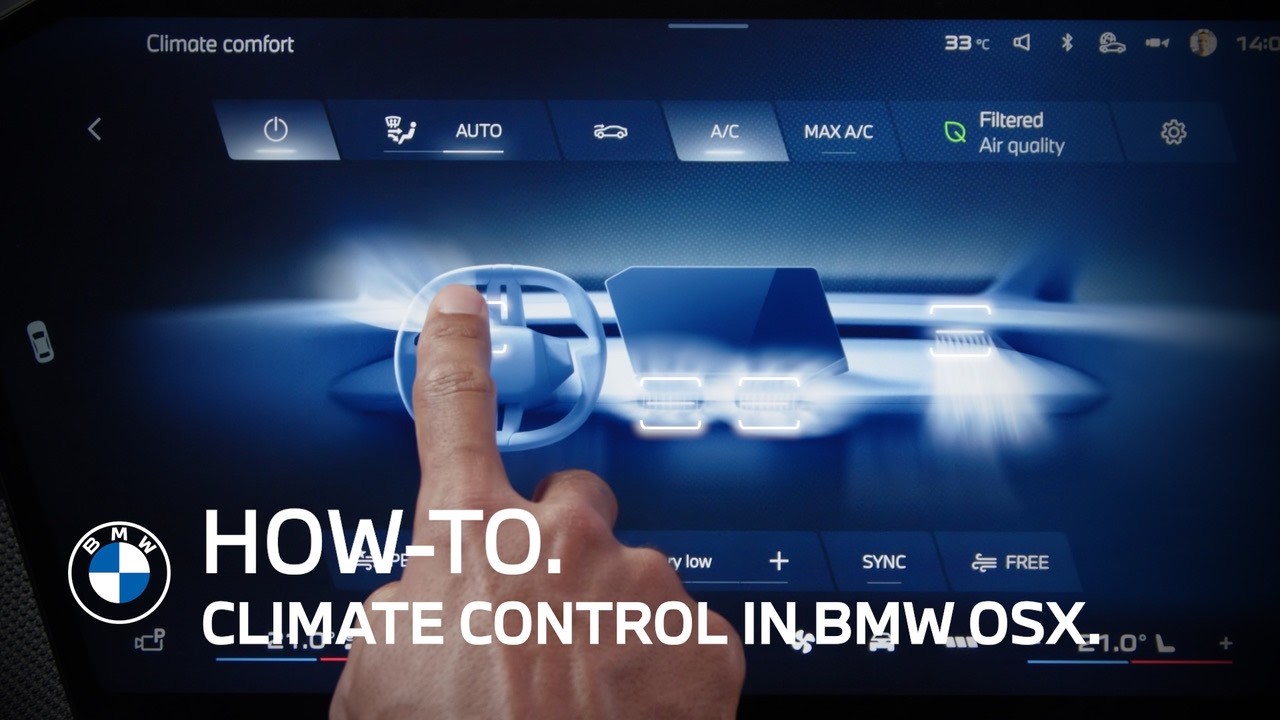
The quick access controls, on either side of the Central Display, let you adjust your desired temperature for the driver’s side and for the passenger side.
The climate control will regulate it automatically.
Tapping the “seat-and-steering wheel symbol” opens further quick access.
You can directly adjust the airflow either in “Personal” mode, for which you can save your desired direction. “Direct” for a frontal breeze or “Indirect” for a comfortable airflow around you.
Tap the fan symbols to adjust the amount of the airflow.
The “Max AC” button gives a quick access for maximum cooling on hot days.
Here, you adjust the intensity of the seat heating in automatic or manual mode, as well as the steering wheel heating.
Of course, also the passenger has their own quick access for the airflow settings as well as for seat heating.
Click the fan symbol in the menu bar on the Central Display to access the full climate control menu.
With the “Sync” button, you can decide if you want to control settings for the climate control zones simultaneously or independently.
Even if manual “Sync” is not active, the climate system still reacts intelligently to the seat occupancy in the automatic mode.
For manual operation of the air vents, tap them to turn the vents off or back on individually.
Continue watching our How-To series to explore all the innovative features of your BMW!
Looking for a quick answer? Check out our FAQ page : https://faq.bmwusa.com/
Refer to your owner’s manual or visit: https://www.bmwusa.com/owners-manuals
Need further help? Contact us here: https://www.bmwusa.com/contact-us.html