December 3, 2025
By Karan Singh
Tesla is always a fan of removing excess parts, and often, that also means simplifying information. In this case, they’ve applied the less-is-more principle on the Suspension menu in the 2026 Model S and Model X.
For years, enthusiasts have loved the detailed, data-rich look into the inner workings of the vehicle’s adaptive suspension, complete with real-time monitoring, feedback, and granular controls.
Now, with software changes on the refreshed Model S and X, Tesla has completely overhauled this interface, trading data-rich menus for simplicity with the new Dynamics tab, taking a page from the Cybertruck.
This change follows Tesla’s shift in their user interface philosophy: ease of use and intelligent presets are better than manual, deep-level adjustments.
The Old Suspension Tab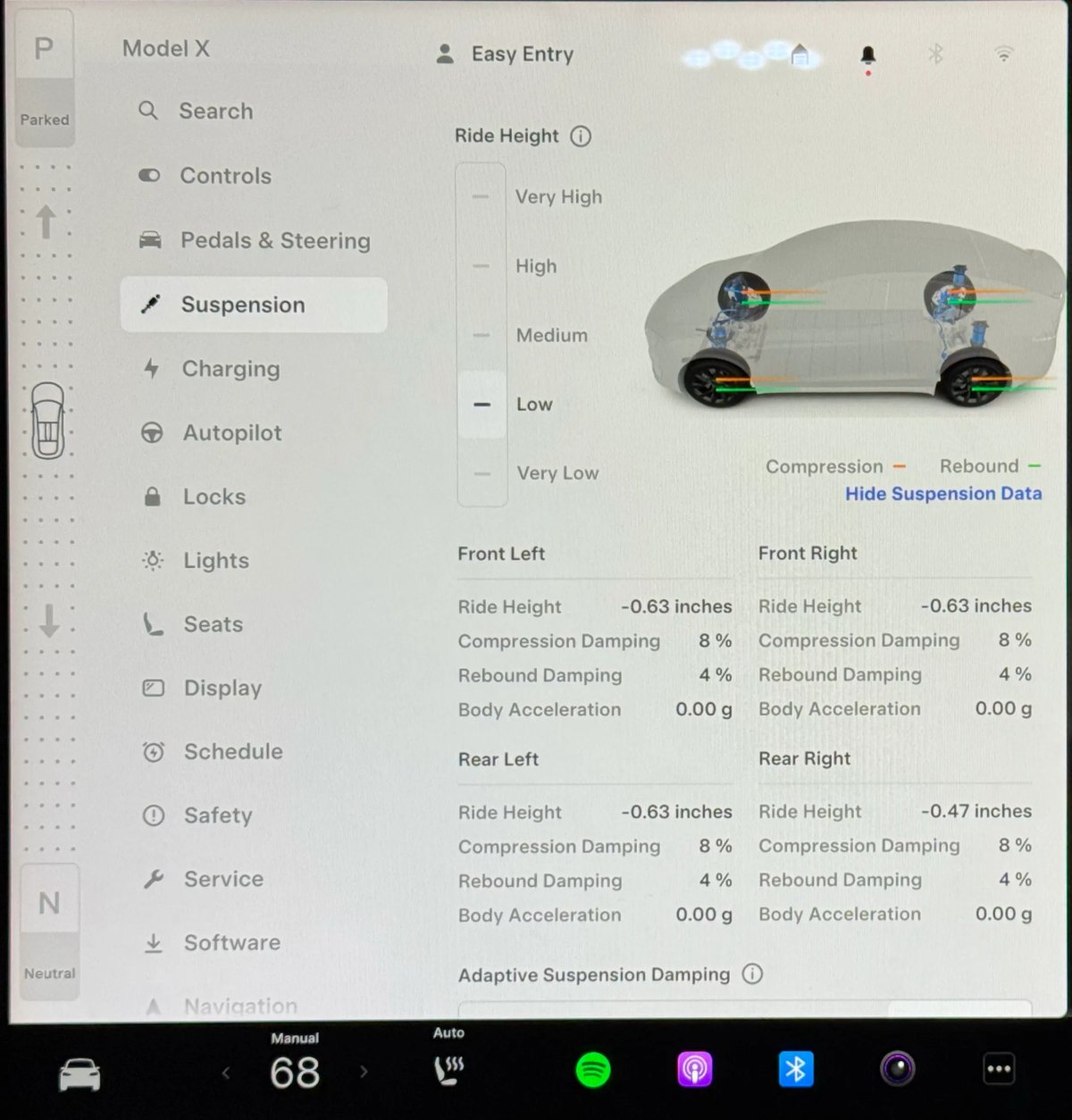
2025 and older Model S and Model X vehicles have a Suspension tab that presented drivers with detailed information about their suspension and offered granular options.
The centerpiece was a live diagram of the vehicle, visualizing how the air suspension was behaving at all four corners.
Tech-savvy owners loved this interface for its transparency and control. It offered real-time data on wheel readouts, including compression and rebound data, body acceleration, and ride height measured down to the millimeter.
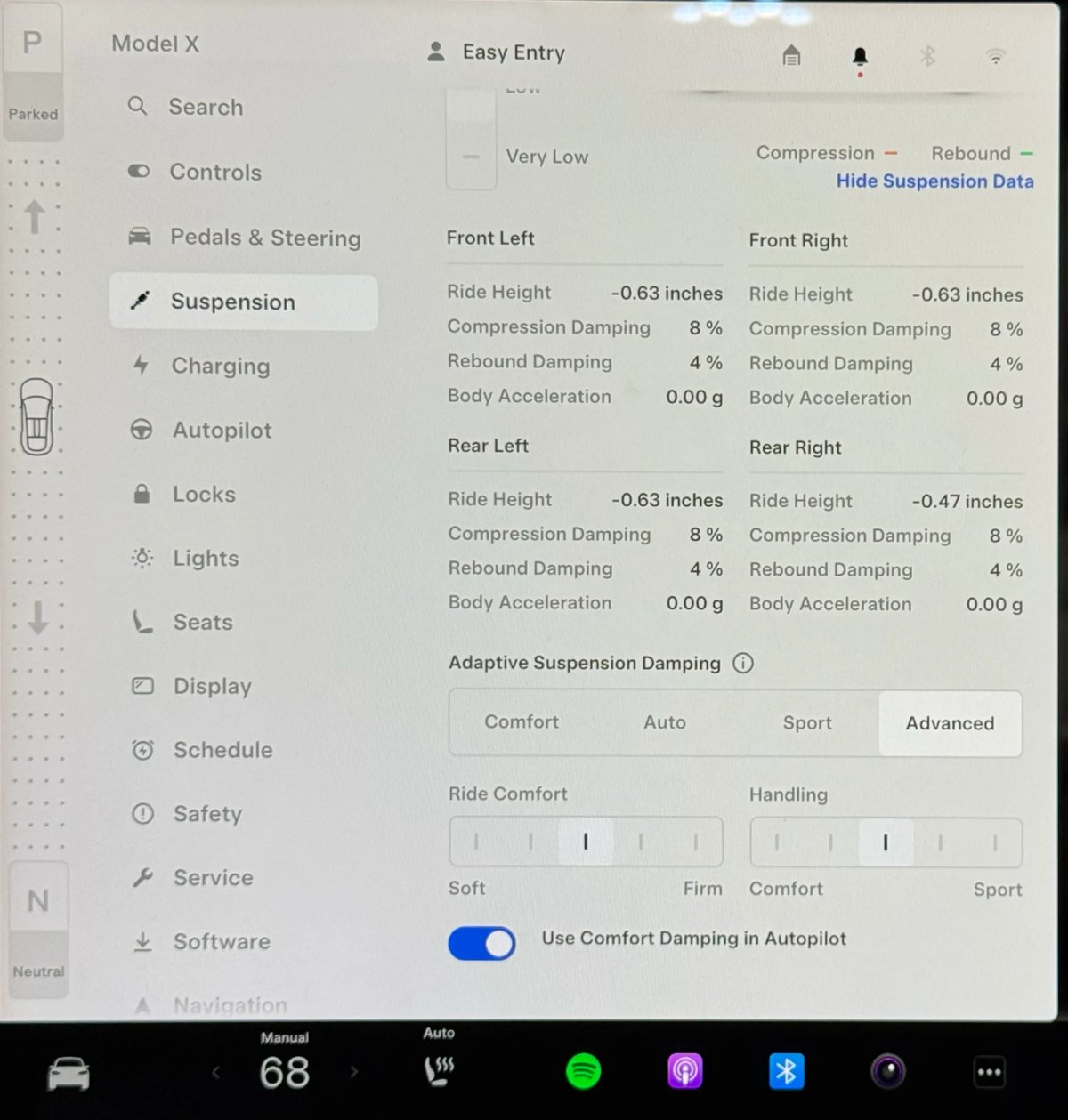
It also offered more precise sliders for ride comfort and handling, enabling fine-tuning of the car’s ride style from soft to firm, and comfort to sport. Alongside that, a multi-step slider provided distinct levels for ride height, including Low, Standard, High, and Very High.
This older interface empowered drivers to tinker and tailor the suspension feel to their exact preference, and rewarded those who took the time to understand its intricacies. While power users likely enjoyed the granular controls, most owners likely found it overwhelming.
Riding into the Dynamics Tab
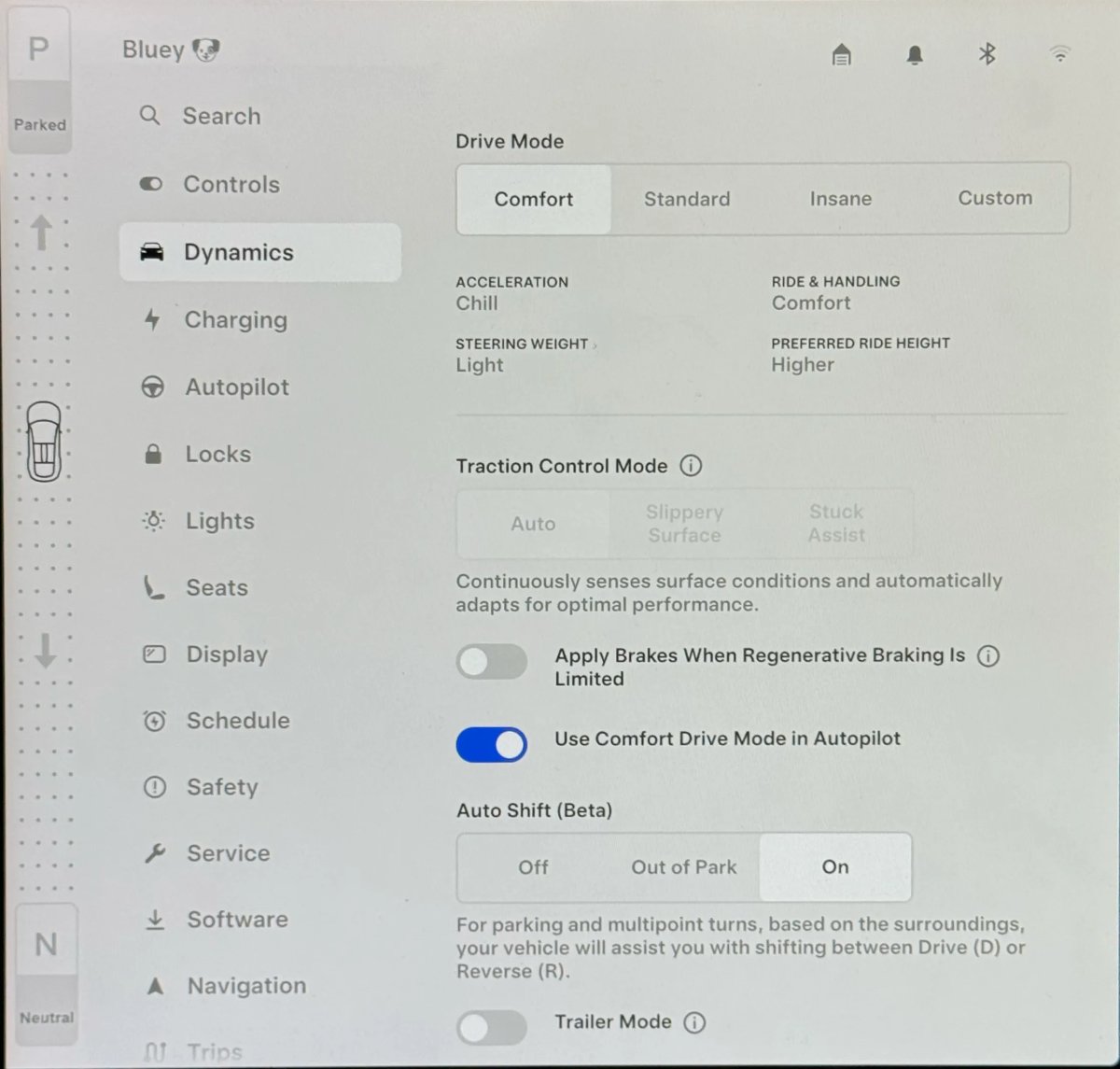
In 2026 vehicles, the dedicated Suspension tab is gone. In its place is a simplified Dynamics tab, which groups all settings related to the car’s driving feel into a single, streamlined location. The new interface does away with the data-heavy display in favor of clean and simple options. It consolidates acceleration modes, steering weight, and ride-and-handling presets.
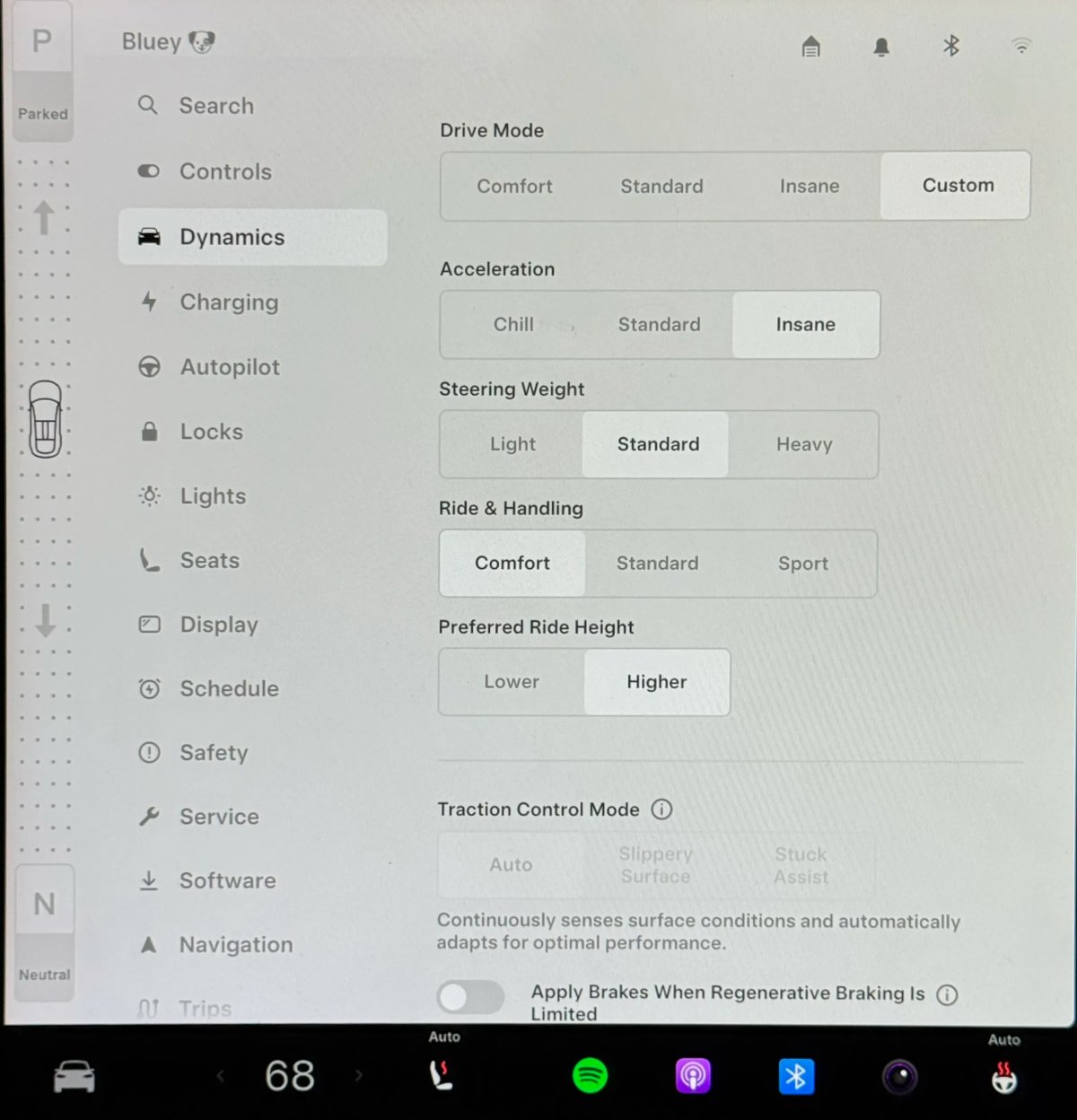
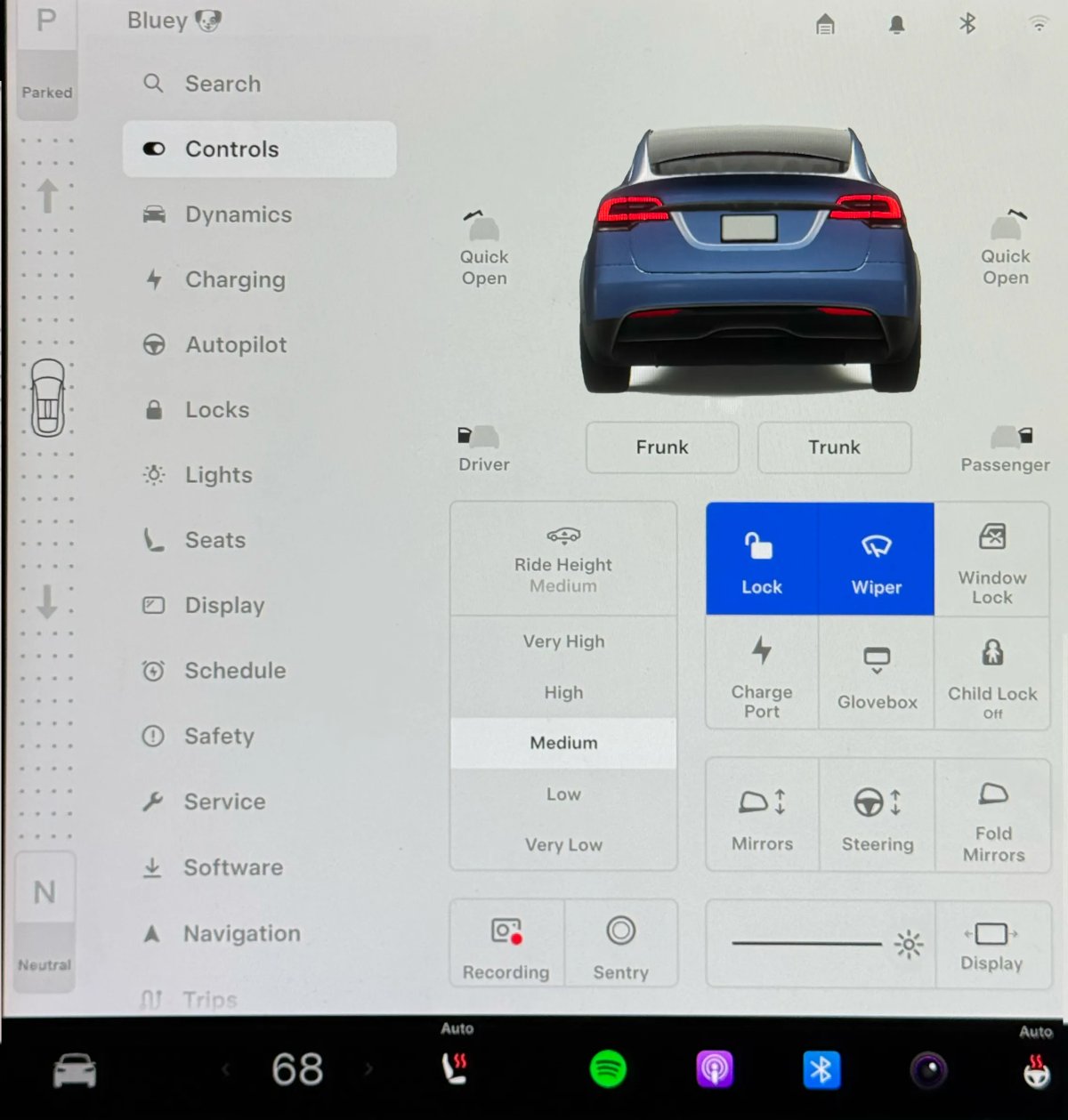
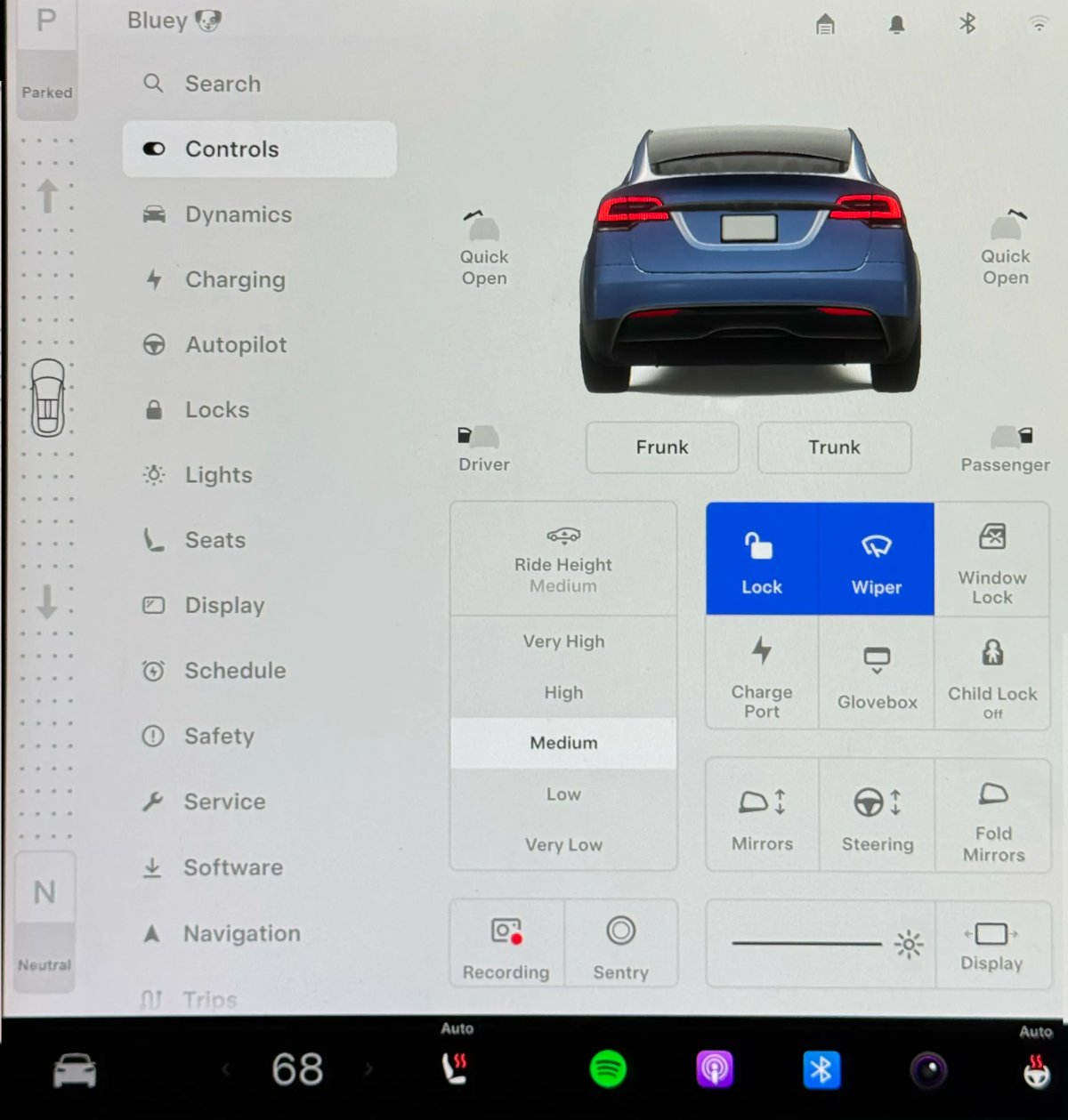
The primary ride height control has been moved to the Controls tab, while users can toggle between Lower and Higher preferred heights on the Dynamics tab, allowing the vehicle to manage the specific heights.
The Drive Mode presets, including Comfort, Standard, and Insane/Plaid, change the settings underneath as a bundle, enabling easy and simple choices for users, while Custom offers some of the old functionality, without the additional level of detail.
A Focus on Simplicity
Tesla’s decision to simplify these menus stems from a clear philosophy of reducing user input and trusting the vehicle’s automated systems to do the brunt of the decision-making. The streamlined Dynamics menu is far less intimidating to new users and significantly faster to use. You can change the personality and style of the car with a single tap, rather than needing to adjust multiple sliders.
As Tesla’s adaptive suspension has matured, the system has become far better at interpreting road conditions and driver inputs. The three presets are now so well tuned that Tesla likely feels they cover the vast majority of driving scenarios, making fine-tuning redundant for most users.
While some long-time enthusiasts will mourn the loss of the vehicle display, the data, and the granular controls, this evolution is a sign of Tesla’s focus on the mainstream user. Many of those functions are still available in Track Mode V3.
 Does Not Apply to Older Models
A lot of owners are understandably unhappy when Tesla removes features they once had. While Tesla could have provided these software changes to all vehicles, it is only applying them to new, 2026 models, making sure that existing vehicles are unaffected by the simplified menus.
This is an approach Tesla has taken for several years. If Tesla wants to simplify options or make major changes, they’ll only apply them to newer vehicles. An example is removing the option for Low regen, which reduces vehicle efficiency. While newer vehicles don’t offer the option, older vehicles can still choose between Low and Standard regenerative braking.
In Tesla’s view, the ultimate luxury isn’t infinite control or fine-tuning knobs or dials – it’s not having to think about any of it at all.
Subscribe to our newsletter to stay up to date on the latest Tesla news, upcoming features and software updates.
December 3, 2025
By Karan Singh
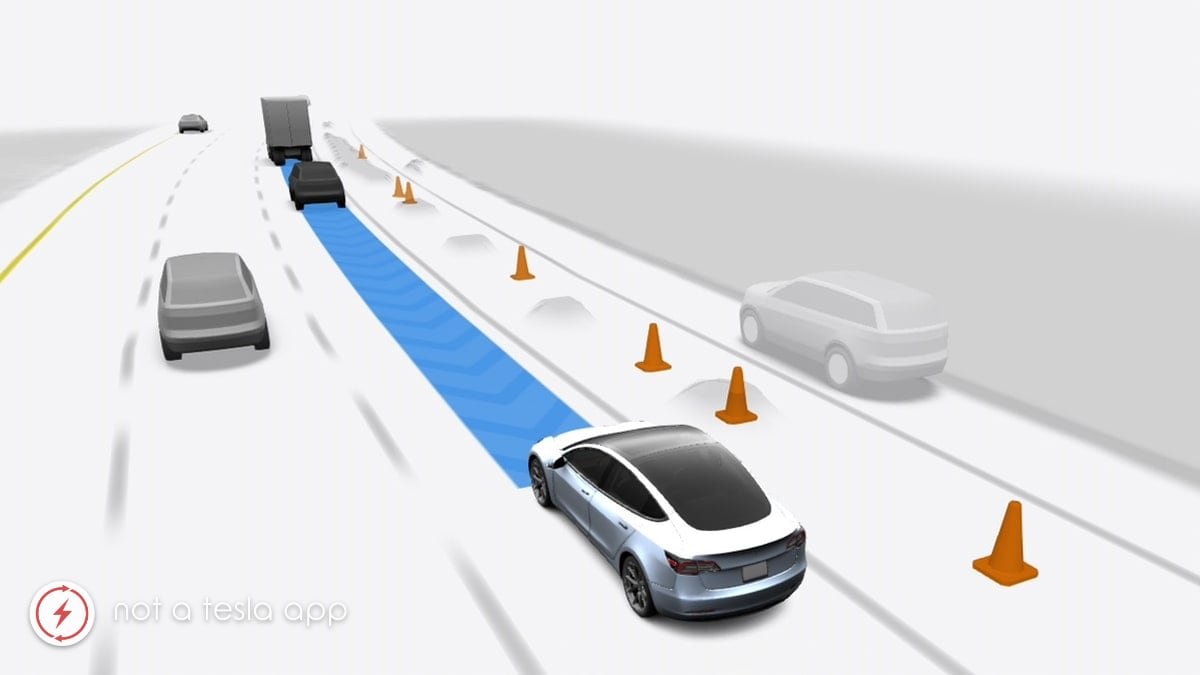
One of the most powerful yet least understood tools in Tesla’s autonomous driving development is Shadow Mode. Running code in shadow mode is a common software engineering method that lets a company test out new code in production without affecting the user.
For Tesla, it’s a core part of the data engine that allows FSD to learn and improve at an incredible scale. In short, FSD runs silently in the background on your Tesla, even when FSD isn’t enabled. The system will constantly make driving decisions without actually controlling the car.
This clever approach allows Tesla to gather an immense amount of real-world data, and it’s a key piece of the puzzle in the quest to solve autonomous driving. Let’s take a look at exactly what Shadow Mode is, how it works, and why it is so important.
What is Shadow Mode
The process behind Shadow Mode is both simple and brilliant. While a human is driving, FSD is also running silently in the background, as if it were in control. It receives the exact same inputs from the car’s cameras and sensors that it would if it were actively engaged, and based on this data, it makes hypothetical driving decisions.
In fact, when you see on your screen FSD’s grey tentacle, that’s exactly what it is.
The crucial step and differentiator between active FSD and Shadow Mode is what happens next. These hypothetical decisions made by the AI aren’t executed, because after all, the human is driving. Instead, the system compares its decision with the driver’s decision and evaluates them. Wrong or different decisions can then be sent back to Tesla for analysis.
Essentially, for every second of a drive, Tesla is collecting data on the countless moments where FSD’s decision matches the driver’s, helping to validate the system’s behavior. But more importantly, it’s also capturing every single instance where they differ.
Data Feedback Loop
This constant comparison allows Tesla to always analyze what the vehicle would do, compared to what the driver actually does.
Much like a textbook’s answer key, the driver’s decision is considered the correct answer, and FSD tries to come up with the same decision. For those who have had FSD for a number of years, you may remember when FSD first started responding to traffic lights — stopping on red and going on green. In this simplistic shadow-mode scenario, FSD would determine whether it considers the light red or green. It would then compare this to the driver’s behavior. If the vehicle thought the light was red and the vehicle went through it, then imagery and video could be sent back to Tesla to help train the system — essentially saying this is what a green light looks like.
Another example of shadow mode use is when Tesla transitioned from ultrasonic sensors to vision for parking assist. Tesla could running vision in shadow mode and compare the distance it thought it was from the object to the output from the ultrasonic sensors (the truth). This was discovered when an owner removed ultrasonic sensors from their vehicle and realized the vehicle continued to detect distances.
These disagreements are edge cases, a real-world lesson that teaches FSD about a scenario it may not have handled perfectly. For owners who have agreed to Tesla’s data privacy policies, these specific moments are packaged as training data to be sent back to Tesla, to help make FSD even better.
Competitive Advantage
Shadow Mode is more than just a clever feature; it’s the key to Tesla’s competitive advantage in the race to develop autonomy. While many competitors rely on smaller, dedicated test fleets that number in the hundreds or thousands, Tesla’s Shadow Mode effectively turns its entire global fleet of millions of vehicles into a massive, passive data-gathering and validation network.
It allows Tesla to test new software builds against an unparalleled volume and diversity of real-world driving scenarios: inclement weather, challenging road layouts, edge-case traffic interactions. All done without any risk to the driver.
That’s a self-improving feedback loop, built into every single Tesla on the road that is nearly impossible for competitors to replicate, allowing Tesla to iterate and improve at unmatched scale.
December 2, 2025
By Karan Singh
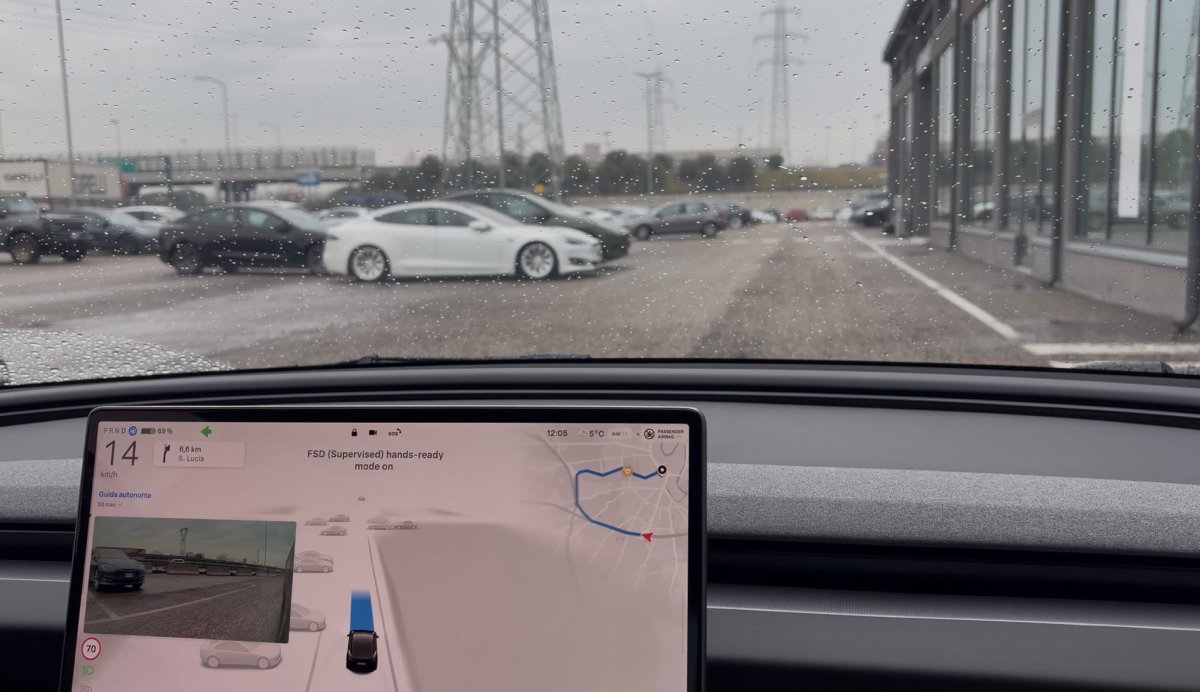
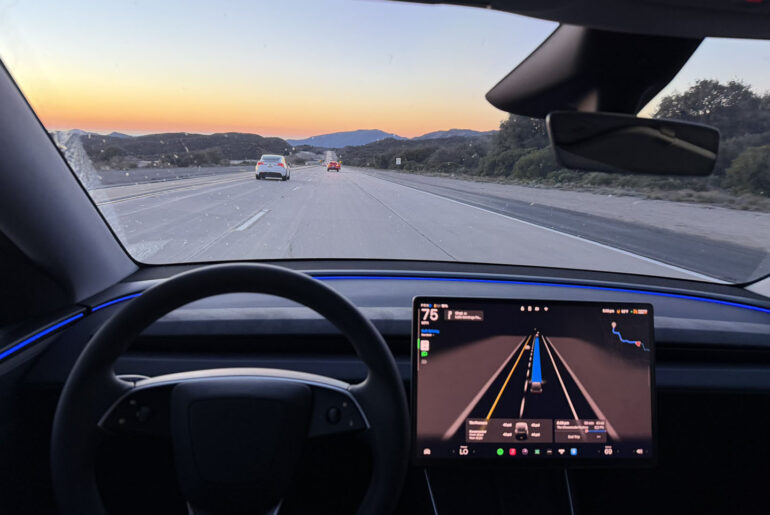
Tesla has officially begun its highly anticipated FSD ride-alongs in parts of Europe, giving the public their first real-world experience with the technology on local roads.
While the underlying neural nets are still FSD v14, early observations from participants in Germany, France, and Italy reveal that Tesla has tailored the experience to appease strict European regulators, making it a little different from its North American counterpart.
Same Stuffing, Different Packaging
Participants are being driven by Tesla employees in Model 3 and Model Y vehicles running FSD v14.1.7. While this isn’t the latest build (v14.2.1 in North America), it is a recent v14 build.
This version includes several distinct UI changes and behavioral constraints that highlight the tightrope Tesla is walking as it works to get FSD approved by bodies like the UNECE. The car may “think” the same way as its American cousins, but it acts with European politeness.
“Hands-Ready Mode”
The most immediate visual change on the display is how FSD defines the driver’s role. In North America, when engaging FSD, the UI displays “FSD (Supervised) hands-off mode on “ if the vehicle is using the cabin camera to detect inattention.
However, in Europe, when engaging FSD, the display reads: “FSD (Supervised) hands-ready mode on.”
That’s some fairly different language, and almost certainly a compliance measure for the upcoming UNECE DCAS (Driver Control Assistance Systems) regulations. European regulators are defining a specific category for systems that allow hands off the wheel only if the driver is monitored and immediately available to take over.
By calling it “hands-ready”, Tesla is aligning the interface to the letter of the law — continuous torque on the wheel is required, but instant readiness is required.
Speed Limit Controls Return
Most FSD users are accustomed to selectable speed profiles, ranging from Sloth, Chill, Standard, Hurry, and Mad Max. These allow your vehicle to select speeds and aggressiveness and lane changes based on the profile — essentially letting FSD decide how fast to drive.
In Europe, the speed profiles are notably absent on the UI, instead leaving space for a user-selectable max-speed setting, just like FSD v13. A user in Italy noted that the Tesla employee set the max speed to +10km/h, which would allow the vehicle to do 70km/h in a 60km/h zone — similar to the old relative max speed option in older FSD builds.
Informing Before Acting
Another returning UI feature, this time from FSD V11, is an explicit broadcast of intent on the screen. A few seconds before FSD begins a significant maneuver, text appears on the screen informing the occupants of the car’s plan – for example: “Initiating left turn maneuver.”
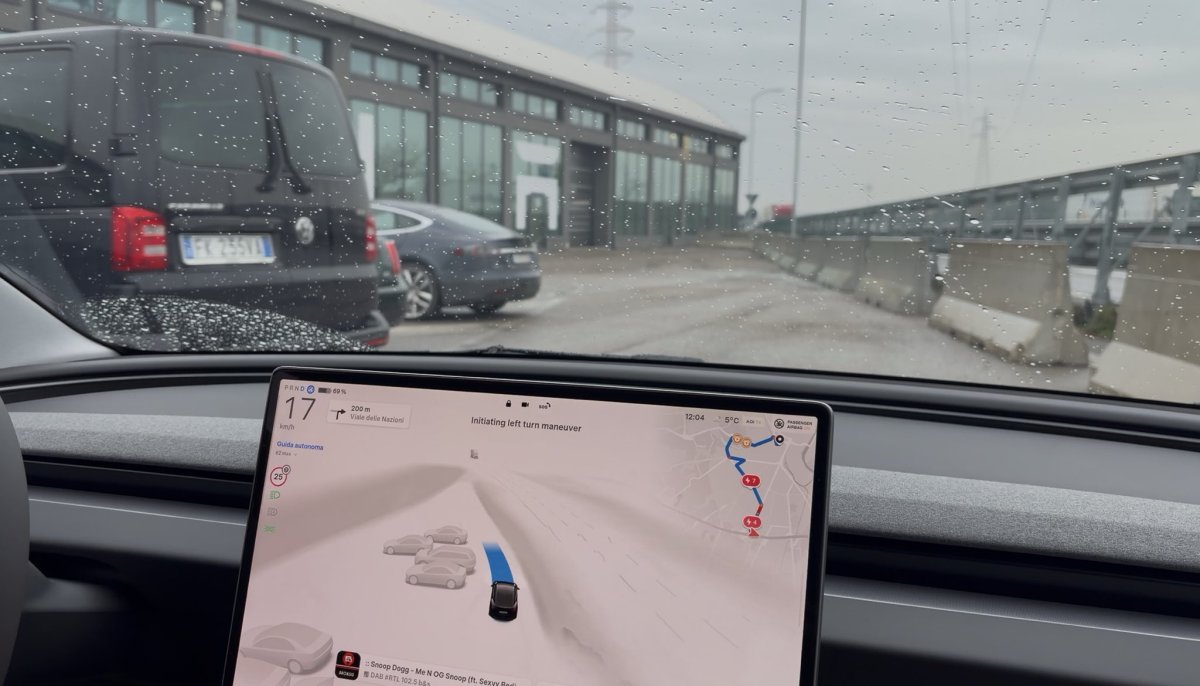
This addresses additional UNECE regulatory requirements on DCAS systems, informing drivers before it initiates its own maneuvers. This also helps to inform new-to-FSD users exactly what is happening as their ride-along vehicle drives itself without any human intervention.
Translated On-screen Messages
Interestingly, Tesla has also gone ahead and done all the work to translate all the core FSD messages, including the disengagement message. Tesla has already provided FSD changelogs in various European languages, but this is the first time we’ve seen the FSD messages localized in these languages.
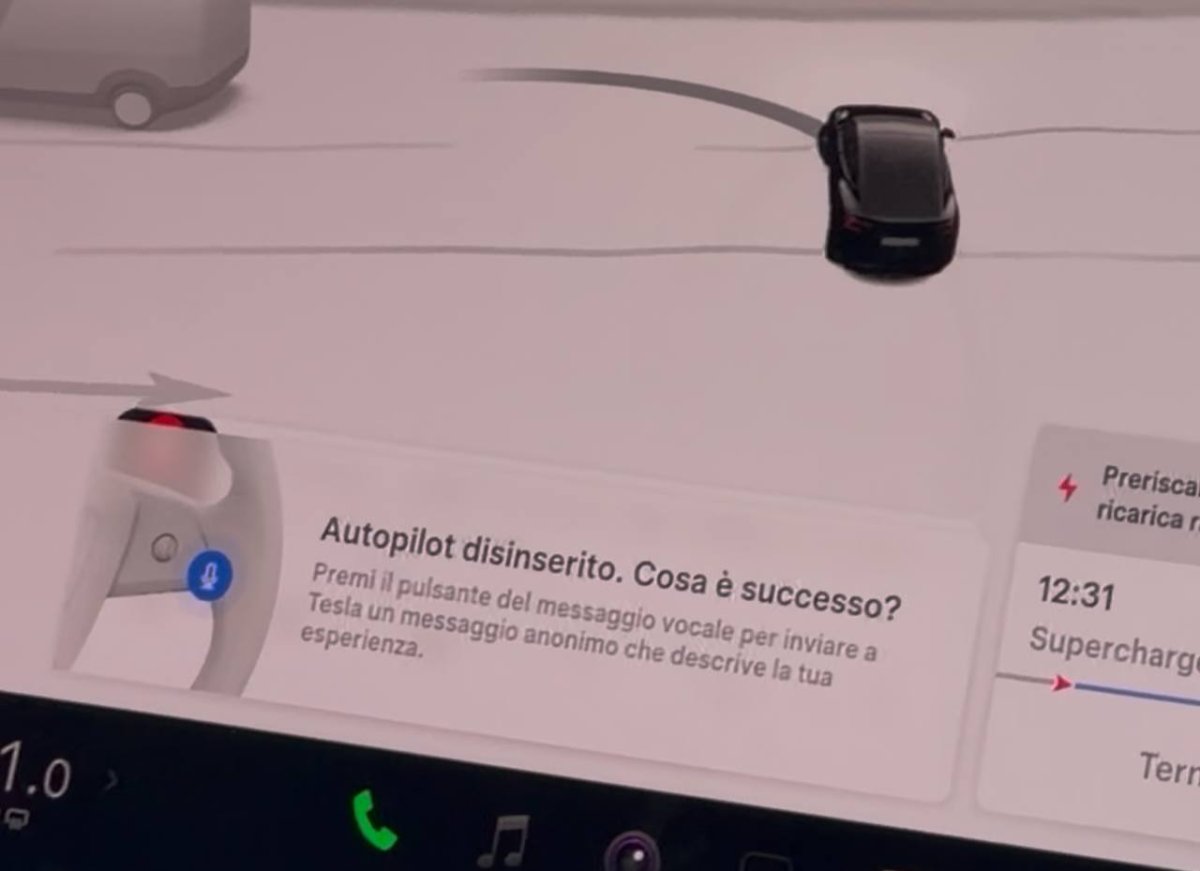
Tesla is getting closer to European approval, and with the earliest tentative date in February, we could see FSD in parts of Europe in just a few short months.