I’ve Never Seen an Ebike Go This Low Before! Heybike Ranger 3 Pro
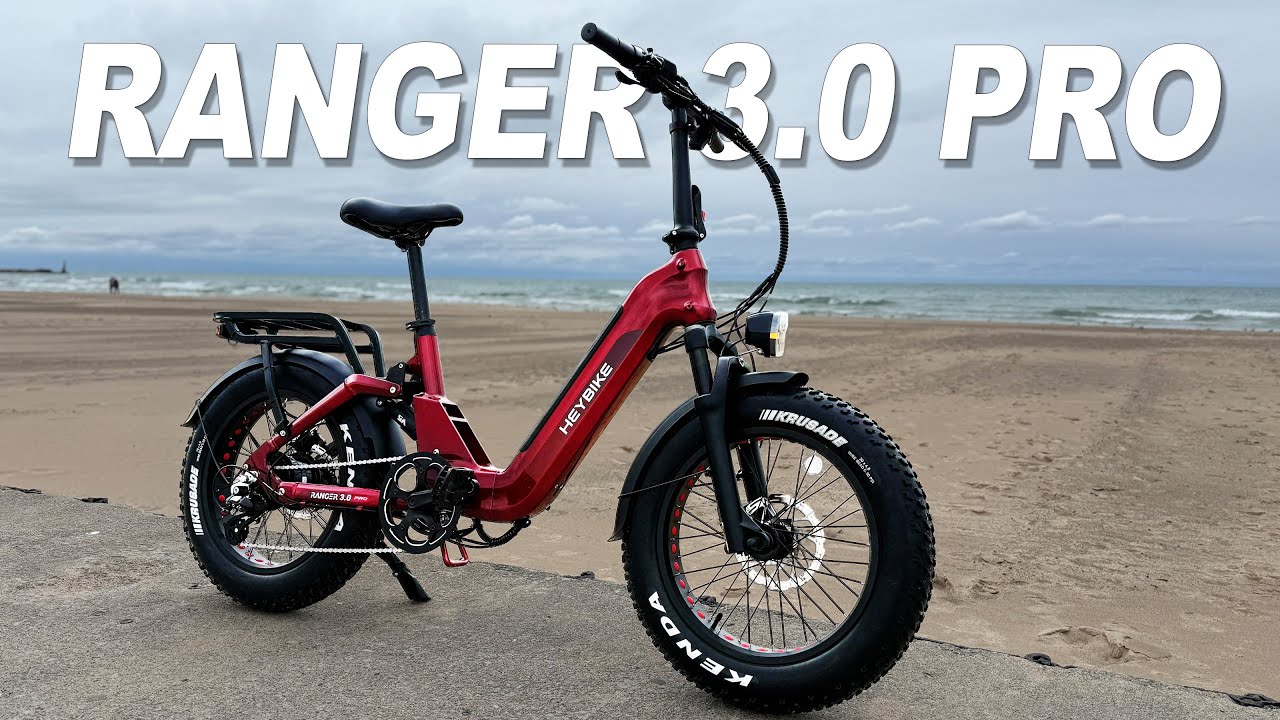
Oh, I’m a rebel. Last year, I reviewed the Heyike Ranger S 100 watt eBike, and I thought that it was excellent. It made it on my top of my list for folding ebikes for 2024. Now, this is the Hayike Ranger 3.0 Pro. Will it make this year’s list? I don’t know. So, let’s get into it. When you receive your Hey Ranger 3.0 Pro. It’s going to come to you as a class 2 eBike, which means it can reach up to 20 mph via your half twist throttle here on your right hand side, your torque sensor down below, and your five levels of pedal assist. This bike can also be unlocked to class 3 speeds, taking the bike up to 28 mph. The Ranger Pro weighs 75 lbs and has a maximum payload capacity of 440 lb. And during the making of this video, you can purchase this bike for $14.99 and it comes with a 2-year warranty. Hey says that the average rider height starts at 411 and goes to 6’2. The Ranger 3.0 comes in four different colors. You have this beautiful ruby red that I have right here. It also comes in sapphire blue, emerald green, and a limited edition Miami sunset. Hey Bike says that you can get up to 90 miles on a single battery charge if you leave the bike in pedal assist number one. This new Ranger Pro comes with a 48vt 750 watt galaxy e drive motor. It has a peak power of 1200 watts and 80 newton meters of torque. It comes with an 8-speed transmission, a Shimano Altus derailer, a 48 to chain ring and an 8-speed trigger shifter. For stopping power, you have two piston hydraulic brakes with 180 mm rotors, which have been upgraded to 2 mm in thickness. The front forks are hydraulic. They have 65 mm of travel. You can preload them and you can lock them out. It rides on 20×4 Kenda Crusader tires. They have a multi-terrain pattern on them and they’re puncture resistant. The back suspension comprises of this unique triangle setup and an adjustable air shock with 30 mm of travel. To adjust the air in the shock, you’re going to need a shock pump, which is one of these right here. You cannot use a normal tire pump. You’re going to blow it up. There is a small dial right here. It’s black. It’s hard to see. I had to look for it. And then you got to take that little lid off. Attach your shock pump and then add the appropriate air. Your battery is in this down tube right here. It attaches here from the top. It is a 48vt 15 amp hours with 720 W hours of power. Now, you can charge it up with this charging port right over here. It will come with this 2 amp charger, which means you can charge this bike up and from 0 to 100 in about 7 hours. Now, you don’t need to leave it on the bike. You can remove the battery and charge it someplace else. To remove the battery, it’s going to come with two sets of keys. Make sure you separate them in case you lose one, you don’t lose them both. From there, you’re going to turn it forward. The battery pops out just a little bit, and you can easily pull it out. It does have a battery indicator light right there, so you can see how much power is in the battery. And then you just put it back in. You clip it, turn it back, it’s locked in, and you’re good to go. The Ranger 3 Pro has a UL certification of 2271 and a UL certification of 2849. It also has an IP65 rating, which means it is protected against low pressure water streams from any angle. Additional features include plastic fenders, plastic foldable pedals, quick release seat post, and a medium width seat with a comfort groove in the middle. A rear rack that can hold up to 100 lb. One thing I’ve noticed is that the rack itself does not touch the paint. So, you would figure that if it’s holding that much weight, it would be rested upon the frame, but it is not. Mounting points for a front basket and a telescopic stem. Since this is a folding ebike, I’m going to show you guys how to fold it. We’re just going to lift up on this tab and pull it out. This allows your bars to come down. We’re going to take your pedal, fold it in, and then on this side, you have a clamp where you just push up on it, and it unfolds extremely easy. At that point, we can just turn the bike upon itself. Super easy. Put up the kickstand and folds it up. And there you go. When folded, the bike is 41 in long, 32 in tall, and 20 in deep, allowing you to easily fit it in the back of an SUV. Let’s talk size and fit. Now, when you take a look at the overall length of this bike, it is 69.7 in, which I think is a a good length for a bike. When it comes to adjustments though, you can bring these handlebars straight up and straight down for your taller rider. There are lines on it. Kind of tells you how far up you can go. We’re going to put mine about right there. And then for your shortest rider right there, that is your seat height. This also has numbers on the back of it. I’m going to show you your tallest rider height right here. So, if you take that and this boom, that is your setup for your tallest rider. Now, I am 5’9. Have a 32 in inseam. I’m a cancer. I like long walks in the park. That is that’s not true. And I’m 225 lbs. I have a 32 inch inseam. And this should be about how I ride this bike today. I might have the seat up a little bit higher, but this is how it should work when it comes to the suspension. Cockpit operations. On your left hand side, you have a very thin but kind of soft grip right here. This is your rear brake lever. You have your left and right turn signals right here and a horn. And this is your display and control pad. I forgot to mention that there is a power button here on the battery. It’s on the bottom right. So, before you can turn the bike on, you have to turn your battery on. To turn on the bike, you will need one of your two NFC cards. You’re going to hold down on the M button here. It’s going to pop up and then you have to hold your card next to it and your display lights up. Your display is in full color. Right here is your battery indicator, but it also shows you how many volts the battery has, which I really, really like that. This is going to tell you your speed. This will tell you how many watts you’re putting out. This will tell you your pedal assist level down here below. And you’ll get various information from here. To get that various information, just press your M button here real quick. It goes from odometer to trip to volts to time on the bike, average speed, max speed, and then it goes back to odometer. To go up in pedal assist levels, you’re going to hit your up button. See, now you can see all the full color in it. And where that is your eco mode, tour, standard, sport, and turbo. To turn on your headlight, you’re just going to hold this up button until the headlight comes on. The screen dims a little bit, and you have a headlight indicator right there. To turn it off, you’re just going to hold that button again. To go down in pedal assist levels, you’re just going to hit this down arrow, and it’ll take you all the way back to off. Right here, you have your lighting control panel. That’s your left turn signal. That’s your right turn signal. It does not show up on the display. So, you’re just going to have to feel around to know that this is in the middle. And then this is your electric horn. I am a big fan when it comes to the headlights and tail lights that are on these hay bikes because it has a bright light here. Their logo lights up whenever your headlights on. And these right here are turn signals. That’s your left. That’s your right. The tail light is just as nice. I know my camera is showing everything is flickering, but really in real life it’s solid right there. And then whenever you hit the brakes, that’s when it flashes. So if we go ahead and turn the headlights off, this is what your brakes look like when you hit them. And your turn signals. On your right hand side, you have your half twist throttle right here, your rear brake lever, and this is your gearing. To go down in gear, you’re just going to use your thumb and push it down. And then to go up in gear, you just use your index finger. Let’s hop into your advanced settings. To activate that, you’re going to hold your up and down buttons, and it’s going to take you into here. You can control your display settings by setting up your system from miles per hour to kilometers. We can control our brightness. We can have the bike auto shut off. You know what? Let’s go ahead and change that. I want to put that up to a higher amount. That way it doesn’t shut off on us. Then we’re going to hit the M button again to lock it in. Auto headlamp. You can turn it on and off so that where it’ll automatically turn on if it gets too dark. And then you can choose on your battery indicator from voltage to percent. You know what? Since we can see it there, we’re going to put percent up here at the top. We want to bounce over here into basic presets. So, we’re going to go all the way up. And now we can hit the M button. It’s going to take us over here to basic settings. We have wheel size. Battery voltage. Low battery is at 41. Yeah, that makes sense. Password and settings. So besides an NFC card, you can set up a password on this bike, making it very hard to steal because if they do steal it, at least they won’t have any way to power the bike up. Let’s hop into the advanced advanced settings, the double advanced settings. We can change our speed limit here, the amount of current that goes through. Do we want auto cruise control to kick on? You know what? We’re going to turn it on and see what we feel about that. So yeah, let’s turn that on. You can control whether the bike has a walk feature or not. We want that. Assist levels, we can go from five to 9 to three and back to five. Holes in the motor, we’re not messing with that. Start mode zero. So zero means that the throttle will work if the bike is not moving. If you put it on nonzero, that means you have to be pedaling for the throttle to work. We’re going to keep it on zero. Drive mode. This means pedal assist and throttle will work. But if you switch it around, you can do it to where only pedal assist works or only throttle works. We’re gonna keep it at to start sensitivity. So, we can make this more sensitive on the start. Yes, let’s do that. I want to set it to start sensitivity zero. We’re going to do start strength at zero. That should be the most aggressive. And let’s go ahead and hit exit. From here, we can reput it back to factory settings, which we don’t want to do that. And then you can get different information about the bike. This is going to tell you about your trip, your average speed, your max speed. Basically, everything that you can see on the display when you push the M button. Battery info. Gives us our cycle times and health. This is this is very nice. Temperature. Yeah, that has a lot of good information. And from here, we’re going to hook back. And then we’re just going to pop into exit. And now we’re into our normal display. It is time for the road test. And as you notice, things are a little bit different from when I did the specs. It is about a month later. And the reason being is well, we had a controller issue. Hey Bike was really prompt at uh getting out a new one and then I just decided to wait until I came up here to the cabin to go ahead and review the bike. You know, I wanted to show you guys these awesome fall colors, but yeah, it is definitely colder. I can tell you that. So, that’s what we’ll be doing. I’m up here in Michigan, Michigan, and we’re going to head our way over to New Buffalo, and see what that feels like. Actually, this is our first hill right here. Oh gosh. Let me put it in some Let me put it up in Put it into turbo. This is a steep hill, and we have to make it up it. I was not quite ready. I was in too high of a gear, but turbo turbo got it done. Now, today the high is only going to be like maybe hits 50°. Well, it’s that time of year when we start doing cold weather reviews cuz well, I have no choice. That’s what the weather deals me. So, let’s test out the riding the bike with zero pedal assist. Uh, right now I have it in the off position, which means the throttle doesn’t work. You have no assistance to the pedaling from the bike. You’re just riding it like an analog bike. But we were cruising at about nine miles an hour in gear five and it felt pretty good. It’s not that hard to ride at all. Now, if you’re wondering the tires, well, they can go up to 30 PSI and I have them at 25. Let’s go ahead and put this thing into eco and see how that feels. You have some options when it comes to this bike on how it works. Like you can make it to where the throttle is controlled depending on your pedal assist levels or you can make it to where it just goes all the way to top speed no matter what pedal assist level that you’re in. That’s how I have it set up right now. But if we have it in eco mode, which is what we do, and we’re cruising, you’re going to do about 11 m an hour without putting any real effort or pressure on the cranks. Actually, I feel like gear five is a little bit too low. Let’s put it into six. Seven feels great. This is the thing that I like about a torque sensor. It only gives you power. The more power that you put on the cranks, the more power the bike gives you in assist. And when you have these different levels of pedal assist, well, it just gives you well, it just makes it harder. So, it’s harder for you to pedal top speed in eco mode than it would be in turbo. It just makes sense. But you can cruise at a nice gentle speed in any of those pedal assist levels. Like right now, we’re cruising 14 m an hour in eco. But if I start cranking down and putting pressure on the cranks and speeding up, we’ve already shot to 17 mph, 18, 19, 20. So, you guys get the idea. It should go all the way up to uh close to full speed. That just depends on how much effort that you are going to put in while pedaling. And you can set all of that up in the app. You know what? Let me show you that. This is the Hey Bike app. It is connected to my Ranger 3.0 Pro here. And you can personalize it, upgrade your firmware. You will definitely want to upgrade the firmware when you get this bike. You can allow other riders to connect cuz as you as I showed you before, you either need a password or that NFC card to start the bike. And you can set that up for other people as well. Let’s go into personalize. This is where you can set your speed settings. You have miles per hour. You can set your top speed. So, you can take it all the way down. How low can we take it? 1 m an hour all the way up to 28. So, you can move this bike from a class 2 to class 3. Throttle speed limiter. This is what I was just talking about. You can have it if you have it in the on position. Your throttle is only going to go as fast as each pedal assist level. Or you can turn that off. If you don’t want to have five pedal assist levels, you can take it down to three. And then in those, you can adjust how fast each level will go. So, it’s like a torque sensor, but it has cadence sensor lockability about it. This is what we have it set up for right now. Right here, level one, all of this, 28, 27, 26, 25, and 24. So, that’s how I have it set up, but you can adjust any of this. And this is how it’s going to be. There’s some other settings that you can do as well, like uh the back lighting on this on the app itself. You can reset your trip distance, which we’ve already done. Right here, it shows we’ve gone 08 miles so far. We are running Strava, so we’re going to see how uh accurate it is compared to uh what we’re showing on the display. Now, with that said, that shows you how this uh torque sensor part is going to work. If I put it into a higher pedal assist level, it’s going to give me one or two more miles an hour. I mean, I think it’s a smart feature because then you can really customize how this bike is going to ride and feel uh when you’re on it. So, let’s go ahead and check out the speedometer on this bike. So, we have it up to top speed throttle only. It’s showing that we’re doing 24.8. Um, that’s what I have it locked at on the app itself. So, 24.8. And then the the GPS bounces between 23 and 24. So, it’s probably like a half a mile per hour off. It also shows the wattage that you have going on here. So, it shows that we’re doing about 700 watts. It bounces around between 650, 600, 500. It’s all over the place. So, it is giving us that continual power, and it does show it on the display. What we’re going to do is we’re going to find out number one, what the top speed of this bike is, and number two, how quick we can get it up to that top speed. First, we’re going to do it in throttle only. I have my timer set up here. We have it into turbo. That’s going to give us our top speed, and we’re going to do throttle. 3 2 1 and go. Oh, it has a very slow and gentle takeoff. Definitely not going to throw you off of the of the bike at all, but we already hit 20. So, it does pick up pretty quick once we uh get going. 24 25. Now, we should be locked out at like 28 mph. I think that’s what it showed on the app. That’s the fastest it was going to go. 27. Come on, hit that 28. There it is. Can we go any faster? No, it’s uh the computer has it locked out at that 28 mph. Now, we’re going to do it using pedal assist. I put the bike down into gear 4. We still have it in turbo. And we’re going to see how quick we can get it up to that 28 m an hour. And let’s go. Yes. We’re going to be moving up through gears real quick. I’m already moving them up. Oh, what is going on? It is fighting me. There we go. Now we’ve kicked in. Let’s go there. 28. But can I get it faster? 28. I saw me hit 29. Oh, it’s not if it holds you back. It’s not going to let you. Like you can hit 29, but you can’t keep it. It is time for the brake test. And what we’re going to do is we’re going to do it in two different speeds. One at 20 mph just in case you leave it in class 2 and then the other one at 28 miles an hour. Woo. I think we were right at 21 miles an hour when we did it. And it looks like we’re at 23 feet. All right. I feel like a lot of that had to do with these tires. The brakes were there, but it just these tires just And I’ve noticed that with tires that are like this that it just takes longer for the bike to stop. The brakes feel good though. Everything felt nice. Round two. 28 miles an hour. Let’s go, baby. Woohoo. Everything felt like it was in control. Let’s see where we’re at here. All right, we’re going to use that leaf. Do not move leaf. All right, awesome. 29 30 31 32 33 34. So, at 28 mph, the bike is going to stop in 34 ft. Everything felt controlled. Everything felt good. Is it the best at stopping? No. But I think a lot of it has to do with the tires. So, but if you are breaking this and you have to break it quickly, just give yourself some room. You’ll do just fine and you will be able to do it in control. All right, let’s move on. One of the things that I knew by coming up here is that I wouldn’t have a hill that as steep as the Hill of Pain, which goes from 0 degrees to a 20° grade. So, a couple days ago, I went ahead did the hill test on the Hill of Pain, and let me show you that so you can see how this bike performed. This is the hill climb. Now, this hill goes from 0° all the way up to 20°. And what we’re going to do here is we’re going to test it in different modes. We’re going to use throttle and then we’re going to test out the different pedal assist levels. All right, so first we’re going to do throttle. So, here we go. Let’s put it all the way up into the top pedal assist. We got it into turbo and we are moving up now. We’re not going very fast. We’re only doing about 9 miles an hour, but that’s not bad at all. We’re still climbing up this hill with no problem. Easy breezy. Now, let’s try it in the different pedal assist levels. I have it into eco. Now, I do all of these in gear three, so that way we can see how everything feels. And right now, we’re we’re putting some effort in for sure to make it to the top of this hill. Holy cow. I might need to put it down into a lower gear, but no, we made it. We made it. All right. Can only get easier from here. I now have it into tour. The higher the pedal assist levels, the easier this is going to be for you to do. Now, we’re doing 9 miles an hour. The same speed we were doing by using throttle only. Made it to the top. No problem. Now, we have it set on standard. Oh, yeah. Here’s where things really start to get a lot easier. Yeah, this is making it so much easier. And now we’re doing like 10 miles an hour, 11 by the time we hit to the top. Now we are in sport. And this is when it really gets easy. I mean, we can just haul going right up this m right up this hill. Woo! We’re doing 14 miles an hour. We’re just screaming going up this thing. And now we are in turbo. And holy cow, man. Here we go. We’re like 14, 15. Oh, that felt good. [Laughter] Oh, this this thing was just flying. Whenever you put it into turbo for today’s ride, since I always try to see how far the bike will go, I’m going to keep it mostly in uh standard, and that is like always in the middle. To me, that’s like pedal assist number three on any uh on any bike. I always like to do my distance test where it’s kind of in the middle. If you keep it in eco mode, guys, you’re going to get a lot farther on this bike. Also, if you put it in turbo, you’re going to get a lot less. And with that said, let’s go ahead and turn on the headlights so you guys can see what that looks like while we’re riding. I do like the fact that they have added this bike path that takes you all the way in to New Buffalo. Super nice. Before I would have to ride like on the side of the road on the highway here and with this it’s a lot safer. I mean you guys can see this traffic is going nuts. Let’s take a look at the turn signals so we can see how bright those are whenever we are riding. There’s your left. There’s your right. Now let’s see how these turn signals look. You have the right hand. There’s the left. And let’s go ahead and hit the brakes. There we go. Let’s take a look at the riding position. Right, I’m sitting straight up and down. So, that’s a very nice thing. You know, you can raise this handlebar up or raise it back. And apparently, you can also ride it hands-free. I don’t recommend it, but clearly you can do it. It’s very comfortable. I’m not really hearing much of the motor. I hear it a little bit. It’s pretty quiet. I feel like I hear the tires over the motor, if that makes sense. There is something about a 20inch step through ebike that I like. And uh you know, I just think the the ease of getting on and off of it, that’s always good. The fact that it folds, I love the fact I just threw it in the back of my car and brought it up here. That was so nice as not to have to put um a an ebike carrier on the back. I also have a feeling that the seat is going to do me just fine today. Uh I don’t think I’ve had to replace any of the hayike seats. So, there are certain companies out there that like seem to nail it when it comes to the seats and uh well, hey Bike is one of them. The torque sensor is nice and smooth. The cadence is nice. I have it in uh gear 8 in that standard and we’re doing like 19 20 mph. That’s my happy place. I know that there are bikes that go faster than 28 mph, but very seldom am I even doing that speed. The only time I’m going to go faster than like 20 to 23 m an hour is if I’m on a road and I’m trying to keep up with traffic. I think for most of the people that get a bike like this, that’s going to be your happy place. Heck, you might not even take it out of class 2 mode. And if you don’t, well, it’ll also go farther as well. We are in New Buffalo, Michigan right now. We have made it into the downtown area. All right, we have turn signals on the front and back, which is what I like because then everybody can see me. That part is is there’s no there’s no way to tell you whether you have your turn signal on or off. Like in theory, you could ride around all day with your turn signal on if you didn’t have to remind yourself to feel it so that you know whether it’s on or off. It’d be nice if it showed up on the display. Even better if it made a noise when it was on. We are here at the new Buffalo Beach. We’re going to find out how well this bike can ride in the sand. I’m going to go ahead put it into turbo. We have it in a low gear and let’s go. We’re going to use throttle. We’re going to use pedaling. Whatever it takes to make it through this sand to see how it goes. And this bike is making it right through. Might kick it down into a lower gear. We are throttling it. We’re giving it everything. And we are moving. I mean, I know this sand is a little wet, but it is also super thick. Yes. It’s smoker though. Smoking my legs. It’s smoking my legs. Let’s go over this way. Yeah. We’re getting it done, though. Ah, now the sand is getting a little firmer. There we go. Woo! That right there. That’s freaking workout. Let’s make it back to land. Bravo. This bike performed exactly how I thought it should. And I did that with 25 lbs of pressure in the tires, which if you want it to perform better, well, have less air in the tires. Do I sound winded? Absolutely. That’s hard to get. Woo! It made it though. Ah, this thing’s a beast. Let’s get on some There we go. Nice. All right, guys. If you’re wondering, not only will this bike make it to the beach, but it’ll 100% make it through the beach now that I’m no longer winded. We’re going to head all the way down to Michigan City. We’ve gone 8.2 miles so far. And if I look at the bar here, it still shows that we have a full battery, although we are down to like 49 volts, which is not full battery status. Now, the cool thing is with a bike like this, it is easy to pedal without power. So, if we do run out of battery, well, I can either just pedal at home or I can call the wife and have her come pick me up because we can just fold this bike and throw it in the back. I feel like this could use just a little bit bigger chain ring because I’m doing 27 right now. I have it into gear 8. We’re doing 27 miles an hour and I feel like this thing could ghost pedal. Like if I want to get it up to 28, I can. Oh well, I should probably put it into turbo, but I haven’t. But if I want to go faster, I can. But a little bit bigger chain ring would slow down my cadence to where it wouldn’t feel so frantic. That is one thing that I feel would make it easier to keep this bike at a higher speed when riding. Now, I’m coming up on some people here. This has a horn. Hello. Thank you. Wasn’t sure if they were going to hear it at first, but they did. I was pretty far away when I started hitting it. Let’s look at how the tires perform and how this bike feels. You know, bikes with 20-in tires feel more nimble than these bikes with 26 in tires. You know, these 20x4s, right? They are I mean, it’s just moving back and forth, no problem, and that’s what you want. So, let’s talk a little bit more about these pedal assist levels. Now I have it into eco mode, but because I went ahead and raised the speed limits up inside the app, well, I’m just barely pedaling and I’m doing 22 mph. Now, if I didn’t want to go that fast in eco mode, well, you saw on there where I you can control each pass level individually on what the top speed’s going to be. Because if I crank down and I’m and I was cruising at 22, well, 25 I believe was the limit that I put on this one. Yeah. Well, I think it’s a good idea for those people that just enjoy riding a bike and you want to be able to control each and every pedal assist level on how fast it can go. This is one of the bikes that can do it. There’s a lot of them out there that doesn’t allow you that kind of feature and you just kind of have to like deal with it, right? I think that is a really good feature that Hayike has added because there’s just a lot of companies that don’t allow that. I’ve been in the the Facebook groups of different uh ebike manufacturers and I’ll see where they’re they’ll be like, you know, pedal assist one or eco mode goes too fast. How do we, you know, make it go slower? Well, with a lot of them, you just have to either up the metal the amount of pedal assist levels or something like that. But with this, you can fine-tune this bad boy so that each level goes the exact the exact speed that you want to go. The speed limit down this road is 25. I look down, I’m doing 26. I’m a rebel. As I look down, we’re at 43.8 volt. And the bike is starting to slow down. I can tell that we have less power going to it. I probably should turn around, but I’m not. We’re still going this way. Let’s do some off-roading. Here we go. Yeah. Okay. I can feel how everything is working. Right. We’re moving right along. No problem. I do feel the full suspension working. I feel it from the front forks and that rear suspension. We’re just moving right along. All right, guys. We have made it here to Michigan City. This is the beach that they have right here. And at this point, we have 43 volts. So, we’re going to we’re going to head back. We should have 5 miles to make it back. I’m not sure we’re going to make it. I did put it down into tour. That would be your pedal assist number two. And we’re just going to cruise back nice and gentle. I want to see if I can make it back. You know, we’re going to cruise at like 15 m an hour. Most of this we’ve been doing high 20s because this bike just wants to go. So, we’re going to take a look and see how it handles like a tame ride on the way back here. Although, we haven’t had an issue yet. Um, I feel like the chain has wanted to come off a couple of times. So, I think an improvement that they could do is a double chain ring guard that would keep at least that feeling like it’s it’s felt like it’s wanted to come off a couple times, especially on the off-road, but it it didn’t do it. So, does it need one? You know, I don’t know. While pedaling, we have dropped down to 40.9 volts. I have no indicator on the battery anymore. I just have the outline. Oh, guys, we have a ways to go, too. So, looks like I’ll probably be riding this bike at least a couple of miles without any power. I can say that this is a very comfortable ride. Like, this seat works. I’m okay with the grips, although I am wearing gloves, so there is that. But, you know, I always give you guys an idea of what I think about the grips. And even though they’re like very thin and they’re not double locking or anything like that, they seem to be doing just fine. I’m looking down on here and it shows that our max speed at some point was 32.2 mph. Not sure when I hit that, but apparently I did. All right, we’re going to have to start lowering it down in gears. I can tell that it is really starting to slow down, but I mean it should. It’s been giving us all this power for an awful long time. Some bikes shut off after they hit 41 volts. So, you never really know. But this one’s still holding on. And at least the good thing is is if we do run out of battery power and the bike dies on us that we can still see how far we’ve gone because it holds that trip information. We are at 39.3 volt and we are still cruising at 17 miles an hour. To be honest, I figured this bike would have tapped out by now already. And it’s not. It’s still going. I think it wants to get back to the cabin as much as I do. Now we’re at 39.1. 39.0. This thing’s not going to go any lower than that. I don’t think it can. But right now, that should mean that the battery is dead. That’s what it should mean. Still giving me power, though. 38.7 volt and this bike’s still giving it to me. Hey bike, what have you done to this thing to keep it going? 38.3 volt and we just lost the power. Gave us E63. It’s flashing. But guys, I’ve never seen a battery drop down that low. And the bike was still working. Oh, all right. So, we have a few miles to get home, but the display has not turned off. So, even though it’s not providing us with assistance anymore, it hasn’t turned off the display. I have made it back. So, let’s go over final thoughts. Now, I didn’t have to ride this bike that far. I did about 2 miles with uh no assist at all. I was in gear 2. We did about 9 miles an hour. No big deal. So, this bike is pretty easy to ride without power. So, if you’re having a day like I did where you’re riding it out and you’re doing all kinds of fun stuff and it runs out of power, you should be able to get the bike home just pedaling it no problem. When I look at the display, uh, I was able to stop and it and it came up and I was able to see that we went 26.5 mi when it ran out of battery power. And then when I take a look at Strava, well, Strava shows that we went 25.5 miles, which tells me that, well, it’s only a mile difference between the two. So, I don’t feel that you would need to use a third-party app if you wanted to track the mileage. I do like the fact that this bike can turn on and turn off and it will still keep the mileage. You are the one that gets to reset it whenever you feel. So, if you decide to stop and have lunch or whatever and go out and do some other running and some errands, you’ll still be able to track how far you’ve gone on your ride. Now, I have to tell you, this bike performed exactly how I thought it was going to perform today, right? When it came to the hill climbing, well, the bike made it up in all of the different scenarios that I put it in, from using throttle only to using the different variations of pedal assist, it made it up the hill of pain, no problem. I also had a really good feeling that this thing would do well in the sand. And even though the sand was a little wet, we went a pretty good distance riding in just sand. And the bike did just fine. Yeah, we had to put some pedal power into it and I figured it would do fine because it’s a fat tire bike. Just everything felt really good. I mean, I got a workout out of it, but it definitely made it through the sand. Now, there are some things that I feel that could be improved uh on this bike. Number one, I I feel like they need to add a double chain ring on it. And although the chain did not fall off during this ride, there was a couple times where I felt like it was going to, but it did not. The other thing I would mention is these turn signals. I have a feeling that I had my turn signal on for like a long time. Not during this review, but I’ve ridden this bike many miles before I did this review, and there’s been a couple times where I’ve just realized that I’ve been riding around the world left. And it would be nice if it was some kind of indicator on the screen, or even better, an audable uh bing bing bing. I think that’s the best way to tell somebody if they have their turn signal on or off. But guys, everything else on this bike was doing just great. Felt I had plenty of power here in the back. The bike has good pickup. The seat works really well. These grips, yeah, I’m okay with them. And this half twist throttle, guys, I’m a thumb throttle type of guy, but because it’s a half twist throttle, I was able to have two hands on it instead of just this area to make it turn. So, I didn’t have any hand fatigue while riding this bike. Now, if you are interested in the Hey Bike Ranger 3.0 Pro, guys, I’m going to leave a link down in the description below. And also, depending on when you see this, they might be having the Black Friday sales going on right now. So, go ahead and take a look at that link. If I have a discount code, I’m going to throw that down there as well. I don’t know. This was a pretty good ride today. And if you like these kind of videos, guess what? This is what I do. I do them all of the time. And YouTube thinks that maybe you want to watch this this next video right here next. So, maybe click right there and watch that video. But if not, I want to thank you guys for watching. And until I see you again, enjoy the
Heybike Ranger 3.0 Pro: https://alnk.to/bElkKDG
Save $100 with code: SH100
They have released the Heybike Ranger 3.0 Pro and in this review, I run it through the paces.
0:00 Intro
0:23 Specs
4:32 Size and Fit
5:40 Cockpit Operations
8:02 Advance Settings
10:36 Road Test Begins
14:07 Phone App
18:02 Brake Test
19:31 Hill Climb
25:30 Sand Test
31:38 Off Road
35:33 Final Thoughts
🔥AVERAGE BIKE GEAR
Xnito Ebike Helmet: https://xnito.com/SCOTT
Discount code: SCOTT to save 10%
ROCKBROS Photochromic Sunglasses: https://amzn.to/3pNlKoP
MagicShine ALLTY 1500S Bike Light: https://amzn.to/3IzdzlR
CECO-USA: 1,000 Lumen Bike Light: https://amzn.to/3xxaVae
Lamicall Bike Phone Holder: https://amzn.to/3X8yJOd
FoldyLock Compact Folding Bike Lock: https://amzn.to/3HHcGX1
Hafney Bar End Mirror: https://amzn.to/3mZxtLZ
FlatOut Tire Sealant Sportsman Formula: https://amzn.to/3HhtBRS
🔥FAVORITE BIKE RACKS
CyberRack E2 (2 bikes): https://tinyurl.com/4bvt4s2j
CyberRack E1 (1 bike) : https://tinyurl.com/t4m5r98p
Discount code “SCOTT10”
🔥CAMERA EQUIPMENT
Insta360 X4: https://amzn.to/4bhK5pc
Insta360 X3: https://amzn.to/3xKuEnN
DJI Osmo Action 5 Pro: https://amzn.to/4860LiR
GoPro Hero 12 Black: https://amzn.to/3ZJqlG8
GoPro Chest Strap: https://amzn.to/3Eg8CM6
DJI Mic 2: https://amzn.to/4dRHbrA
RODE Wireless Pro: https://tinyurl.com/ypxtjk45
🔥DRONE GEAR
DJI Mini 4 Pro : https://amzn.to/3PPAEnD
🔥BAG
NOMATIC McKinnon Camera Backpack: https://amzn.to/3b0zchC
🔥MUSIC SERVICE
Epidemic Sound https://share.epidemicsound.com/52ashs
LINKS USED IN THE DESCRIPTION ARE AFFILIATE LINKS
By using the affiliate links I earn a small fee for your purchase, it does not cost you anything extra to use them. They help me to be able to create more videos for you. Thank you for the support!
heybike ranger 3.0 pro, heybike ranger 3.0 pro review, heybike ranger 3.0 review, heybike ranger review, heybike ranger, heybike review, heybike, heybike ebike, hey bike, torque sensor ebike, heybike ranger electric bike, fu ll suspension folding ebike, portable ebike, electric bike reviews, folding ebike 750w