
How to Install Turn Signals on Your Eahora Electric Bike | DIY E-Bike Safety Upgrade
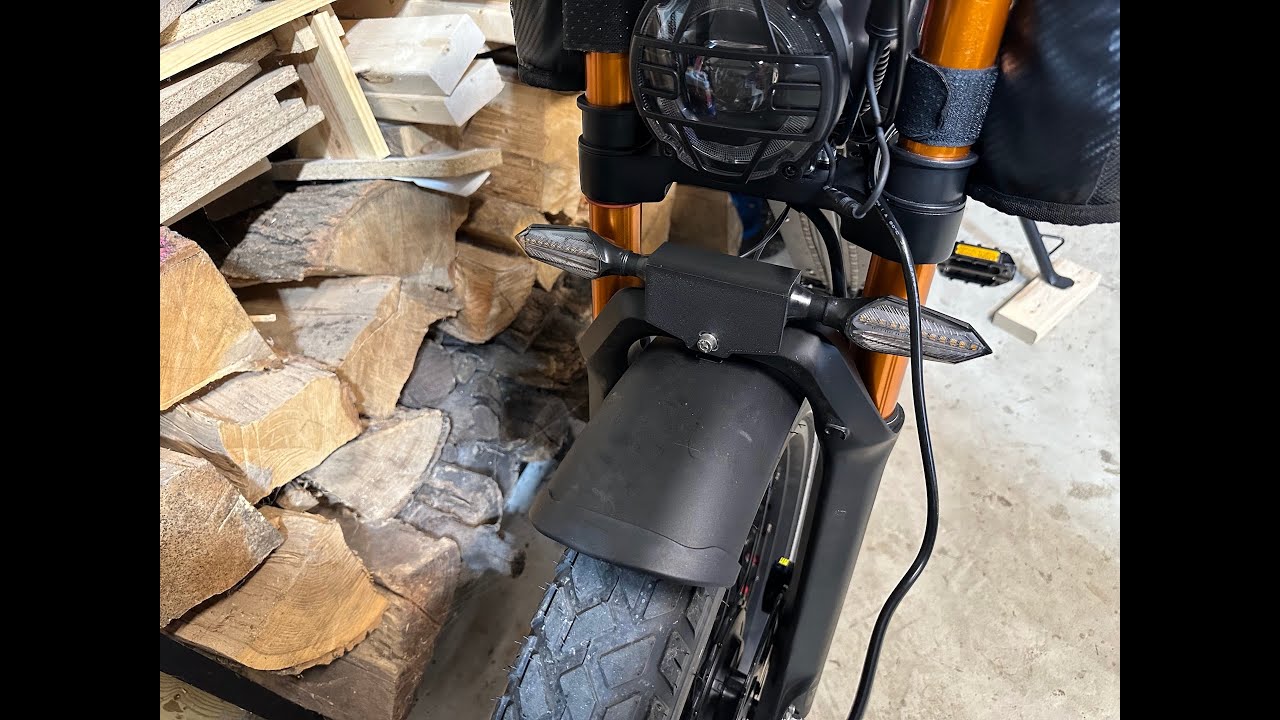
What’s up, riders? Today, we’re upgrading the EHOR Romeo with some slick turn signals so you can ride safer, look sharper, and turn heads. Literally, this is going to be quick, easy, and totally worth it. So, grab your tools and let’s light this thing up. Here is a list of parts that you will need. An XT90 splitter, male going into two female connector, XT90 male to XT60 female reducer, and an XT60 male into wires. What you will want to do is connect the power leads to the turn signal power leads. You will need to cut the connector off of the turn signal kit. Don’t forget to solder and heat shrink the cables to create a better connection. First step is to remove the seat. It is held in place by four 10 mm bolts. To see where the bolts are located better, I have turned the seat upside down. They are located in the following places. In the middle of the bike, there will be wire ties and cable loom. You will want to cut all the wire ties and unwind the cable loom, exposing all of the wires. Once you unwind enough of the loom, you will see the XT90 connector wrapped in electrical tape. You’ll want to remove the electrical tape to expose the connector. This next step is very important. Before unplugging any cables, make sure to power off the battery and remove it from the frame. Once you unplug the cables, the female side of the plug is the hot side. It is where you will plug your adapter that you created at the beginning of the process into the other side of the cable will plug into the open female connector on the Y adapter. Once plugged and start running your turn signal power down the frame of the bike, paying close attention to running it with the existing wires and loom. Next step will be to mount the front turn signals using the included adapter. it will bolt on to the finer bolt. I recommend using the 3D printed cover that I will link in the description to provide a cleaner look. When mounting the lights into the cover, you can unplug the cable in order to thread it through the hole and then tighten the attached nut on the back. Don’t forget the rubber plug to provide better water resistance. Next, we will be unbolting the six Phillips head screws from to remove the front panel from the bike. This is a beauty cover that holds all of the wires that run down the down tube of the bike. We will run the wires down the front and into the small hole at the front of the crank case where we will have the power wires join and plug in and the two wire for the rear turn signal will run out the rear hole and up with the rest of the cable management to the back of the bike. I recommend at this point to mount the turn signal switch. What worked best for me is to turn the horn switch upside down and mount the turn signal switch below it. This allowed for the switches to sit flush with each other, allowing better reach. This is entirely a personal preference and a decision that you will need to make for yourself. Once mounted, plug the wire into the harness. Now, it’s time to mount the rear turn signals directly onto the rear brake light. You can use the included bracket, or for a better fit, print the custom 3D mount I designed. My version positions the lights farther out so they’re not hidden behind the brake light. To install, just repeat the same steps you use for the front lights, but attach them to the rear bracket instead. Now it’s time for wire cleanup and cable management. Route the rear brake light cables over the controllers with the rest of the wiring, then into the crankcase housing. Plug them in, coil up the extra, and wrap all connectors with electrical tape. Reapply the cable loom. Secure zip ties at each connector point and make sure no wires touch the rear suspension spring for a clean, safe finish. Run the wires from the front under the beauty cover and into the wire channel. Keep the two turn signal leads and the switch outside the cover. There’s plenty of wire. Resecure the six Phillips screws, taking your time as they can be tricky. Feed the cable in through the small opening into the crankase housing. Plug it in. Test the system and reattach the crankcase cover. And that’s it. Finish your cleanup work and reattach your seat. Your E-Horo Romeo now has bright turn signals for safer, more visible rides wherever you go. If you found this helpful, hit like, subscribe for more tips, and drop a comment with any questions. Ride safe, and I’ll see you in the next video.
Want to make your Eahora electric bike safer and more road-ready? In this step-by-step tutorial, I show you exactly how to install turn signals on your Eahora bike, including mounting, wiring, and testing your new lights. This DIY e-bike upgrade improves visibility, makes lane changes safer, and keeps your bike looking clean and professional.
In This Video:
Tools and parts you’ll need 🛠
Preparing your Eahora bike for installation
Mounting turn signals on your handlebars and frame
Wiring and connection tips
Testing and troubleshooting your signals
Safety tips for night riding
Why Add Turn Signals to Your Eahora Bike?
✔ Increased visibility for cars, pedestrians, and other cyclists
✔ Safer lane changes and turns
✔ Clean, professional-looking upgrade compared to hand signals
Bike Model: Eahora Romeo Ultra II
Turn Signal Kit Used: V04-36v-60v https://www.aliexpress.us/item/3256807660751080.html?spm=a2g0o.order_list.order_list_main.70.74fd18028OwcDZ&gatewayAdapt=glo2usa
3D Printable Models: https://www.printables.com/model/1384314-electric-bike-turnsignal-mounts
If this guide helps, hit like, subscribe, and leave a comment if you have questions about your Eahora e-bike or turn signal installation.
#Eahora #EBike #TurnSignals #BikeSafety #DIYBikeMods #ElectricBikeLights #EahoraMods #EBikeUpgrades